This blog is not displaying properly. There are odd spaces between posts for some reason. Can you help?
paperblazer dot com/blog/
This blog is not displaying properly. There are odd spaces between posts for some reason. Can you help?
paperblazer dot com/blog/
Hi @jupebox,
Thank you for reaching out to us. I inspected the code of your blog page and there are empty paragraph tags inside your content which is adding the extra space. Please edit your posts and look out for the empty paragraph tags in the Text editor or if you’re using the visual editor then remove the spaces from the content.
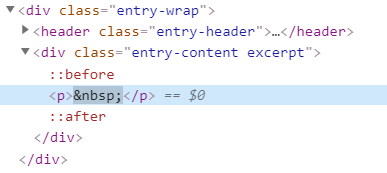
If the issue persists then this could be caused by a third party plugin. Please check for the following as well:
Test for a plugin conflict. You can do this by deactivating all third party plugins, and seeing if the problem remains. If it’s fixed, you’ll know a plugin caused the problem, and you can narrow down which one by reactivating them one at a time.
Ensure everything is up to date according to our version compatibility list at https://theme.co/apex/forum/t/troubleshooting-version-compatibility/195. Please follow the best practices when updating your theme and plugins. See https://theme.co/apex/forum/t/setup-updating-your-themes-and-plugins/62 for more details.
If you’re using a caching plugin, clear all caches including browser cache then deactivate your caching plugin and other optimization plugins.If you’re using a CDN, please clear the CDN’s cache and disable optimization services.
If you’re using child theme then deactivate your child theme and switch to parent theme.
If you still have problems kindly get back to us with the result of the steps above and URL/User/Pass of your WordPress dashboard using the Secure Note functionality of the post to follow up the case.
Thanks!
Okay, but to clarify, I don’t mean in the posts themselves, but on the blog page. The “masonry” layout looks really strange and not like the demo.
Hi @jupebox,
That is not a common issue but I’ve seen that issue a few times. Would you mind Purging All your Cloudflare’s cache and putting it to Development Mode/Deactivate for a while? and see if that resolves the issue.
Purging cached resources from Cloudflare
If that did not work, please do a testing for a plugin conflict. You can do this by deactivating all third party plugins, and seeing if the problem remains. If it’s fixed, you’ll know a plugin caused the problem, and you can narrow down which one by reactivating them one at a time.
Let us know how it goes,
Cheers!
This topic was automatically closed 10 days after the last reply. New replies are no longer allowed.