Hi,
I have this problem on two separate websites using Pro: When viewing a portfolio item, the link to the blog (“News”) and not the portfolio (“Projects”) is shown as active in the menu. How do I fix this?
Thanks! Sandra
Hi,
I have this problem on two separate websites using Pro: When viewing a portfolio item, the link to the blog (“News”) and not the portfolio (“Projects”) is shown as active in the menu. How do I fix this?
Thanks! Sandra
Hi @ki_admin,
Thanks for reaching out.
To remove the highlight from News, you need to disable the Ancestor option from Navigation Inline > Active Links > Ancestor as shown in the screenshot.
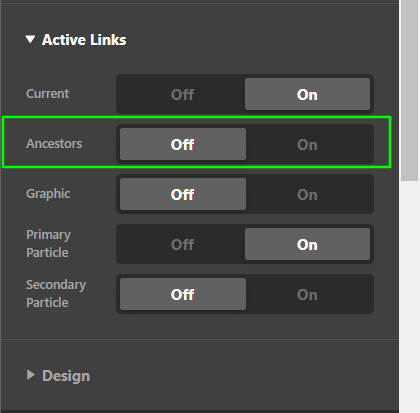
Hope it helps.
Thanks
Hi again,
I want ancestor links on, I just want it to show the correct one. Why does it not show the portfolio page as ancestor to portfolio items? Right now portfolio items act as blog posts in terms of ancestry.
Hello @ki_admin,
You are having this issue because you have a slug conflict.
Your “Projekter” page is using projekter as the page slug while your custom URL slug for the Portfolio items in Cornerstone > Theme Options > Portfolio is using projekter as well. You will need to change one of the slugs so that the Menu can identify the “Projekter” as the parent page of the portfolio items.
Best Regards.
This topic was automatically closed 10 days after the last reply. New replies are no longer allowed.

