Blog in WPML doesn't work

Hi guys,
I come back to you because I have not solved my serious problem. you can see our discuss in link below

I cannot see blog page in all language but only in italian.

I have contact WPML already and they test their plugin with other theme and everything works properly except for X-theme. I dont know why. You suggest me to copy my site over to a staging server in order to trace where the issue is coming from.

This is a problem for us, but I have make backup everything in my PC, so you can work without any problem to understand what is the fault.

I’m looking for your kindly assistance.

Tnx,
Francesco

Hi @Neetra,

Thanks for reaching out.

Something is not properly capturing the global query for that language. It could be due to WPML integration of the theme but I couldn’t reproduce it on my installation.

Would you mind providing your FTP login credentials as well? I’ll try disabling the integration through code and test it again.

Thanks!

Hi Rad,
you can see the infos below

Hi @Neetra,

No luck, but this seems to be related to existing language configuration. Example, in admin, even if I select English, it still in Italian. I tried in clean installation and it works well.

Could you try cloning your site? I like to clean it before doing more testing. This is my first time seeing this kind of issue.

Thanks!

Hi Rad…
how can I clone it? I have backup already. I have not another web space to clone it.

Do you want delete “admin”, “content”, “include” and single files in the main root?

If yes, you can do it if this can help you to solve this problem.

Rgs,
Francesco

Hi @Neetra,

It’s a live site and it may cause downtime on your site. Staging should be a separate copy just for testing.

  1. Please install All in one migration plugin on your live site
  2. Using that plugin, export your site as a File and save it
  3. Install a clean Wordpress in your sub-domain/sub-folder (eg. example.com/staging/ )
  4. Install All in one migration plugin to your staging
  5. Import the saved file using the same plugin

Then your staging is ready :slight_smile: I prefer not touching your existing files, and it’s good for comparing the two.

Thanks!

Ok, I have installed All in one Migration and follow your instraction.
I have created a directory “test” in my root and install new WP.
Everything is going well but if I try to save file through a All in One plugin, an error occurs “internal Error 500”.
I dont know why but I cannot move my site…
:frowning:slight_smile:
Francesco

Hi Francesco,

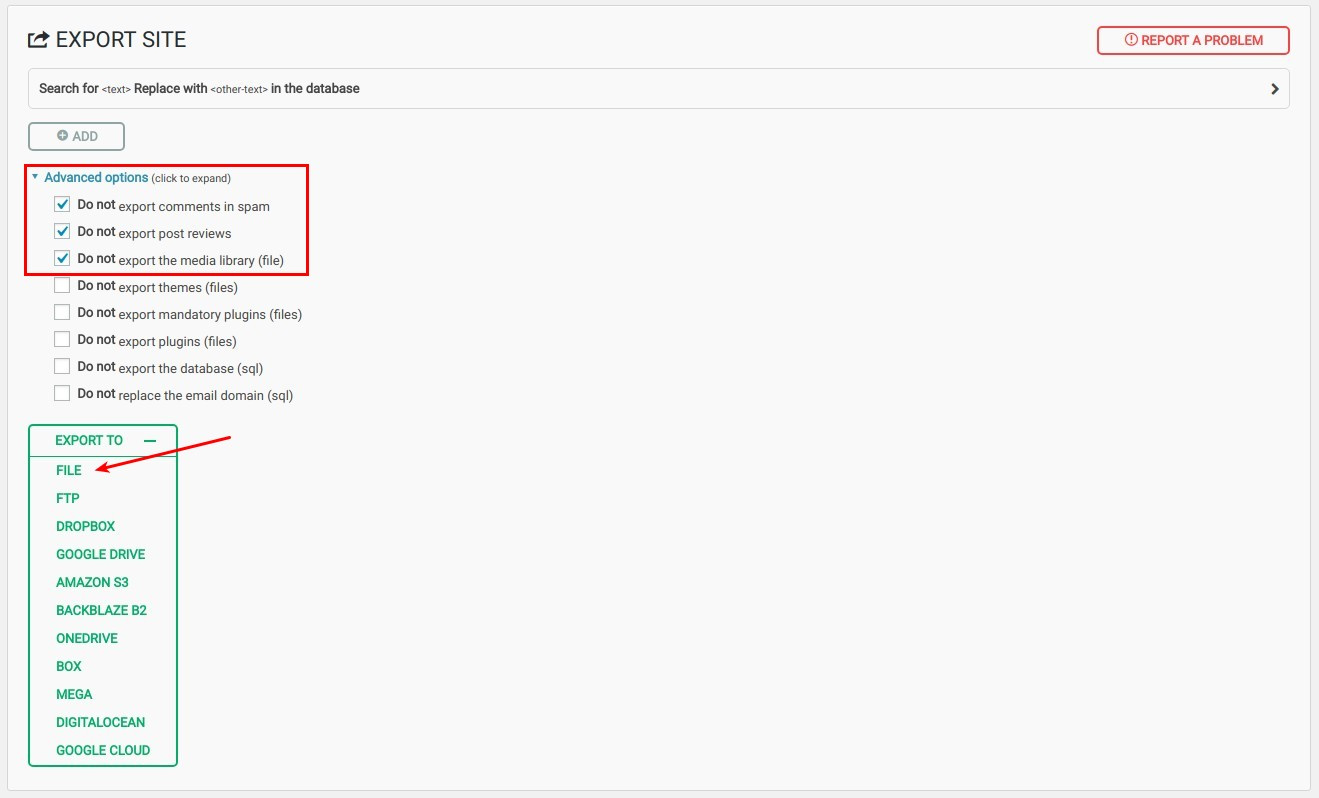
I’ve checked your site with “All in one migration” plugin installed, I recommend exporting the site file with these options enabled:

If this didn’t work, them most probably one of the server resources limit is being exceeded, I suggest checking the server error log in this case with the help of your web host you should be able to narrow this issue down.

Thanks.

I have checked. My server doenst accept °.wordpress file. Now I have solved with an FTP sw but there is another problem now: the file exceed 512MB for free use.
The complete files are 1,5G but if I dont copy anything except DB, the dimension is 550MB. However if I dont copy plugin or any themes it is not good because the main problem maybe is in plugin and theme conflict.

Should I pay 70USD for it?

:frowning:

If you wish to continue using the plugin, yes. Otherwise, you would need to look for a similar plugin which offers the feature you need for free.

Thanks.

Ok, I try for another plugin free. Otherwise I should think to buy it…

Sure, please try it first. Thanks!

hi there,
I have done everything. Now you can make all tests in www.neetra.com/test

Pls, let me know what is the problem.

Tnx for your kindly assistance.

Rgs,
Francesco

Hey Francesco,

The issue is only happening in the Ethos stack and it looks like related to a the index loading bug in Ethos. I changed your test site’s stack to Renew which is the closest design to Ethos and the issue does not happen.

I’ll post this in our issue tracker but for now, you will need to use a different stack.

Thanks.

Ok Chri,
tnx for your support.
Now I have changed it in Renew and everything seems works properly.
Tnx again,
Francesco

You’re welcome, Francesco.

This topic was automatically closed 10 days after the last reply. New replies are no longer allowed.