Blog formatting

Hi X!

We would like to have full width blogs. 2 Questions.

  1. We’ve added some CSS to remove the grey container styling but how do we remove the bottom most grey bar? Between the end of the blog and the comments?
  2. We KEEP selecting Full Width both on WP Page Edit and within Cornerstone Page Settings. It works for 10mins-2 hours and then it bounces back to having the side bar. Any ideas? No other blogs have this issue?

https://digitalassettes.com/money-isnt-earned-its-acquired/

Secure note!

Hi There,

Thanks for the details!

  1. I can see you have added the CSS wrongly.
    Please update the CSS with this.

    .single-post .entry-wrap {
    box-shadow: none !important;
    }

Yous css having an extra ! at the end.

  1. I can’t access the site as the login is not working for me. Please check and revert!

Thanks

Thanks, that got rid of the line! :hugs:

And I updated the password - sorry, typo on my behalf.

Hi INcroatia,

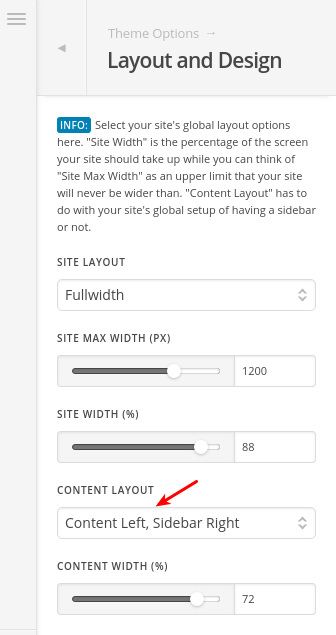
Are you sure you set the “Content Layout” to “Full Width”? I’ve checked your website and I can see it’s not set as full width for now:

Could you please change it to “Full Width” then clear cache and recheck this issue?

Thanks.

THANK YOU for pointing that out!

You are more than welcome!

This topic was automatically closed 10 days after the last reply. New replies are no longer allowed.