Blog Feature Images Cropped on Mobile

Hello,

My site is: https://sakucha.com.au

Blog feature images are being cropped on the Blog page on mobile.

However, they appear full width on both the Blog page and Home page (Classic Recent Posts element) on al devices.

How can I get the Blog page to show them in full width on mobile?

Thank you for the assistance.

Hi Kelsey,

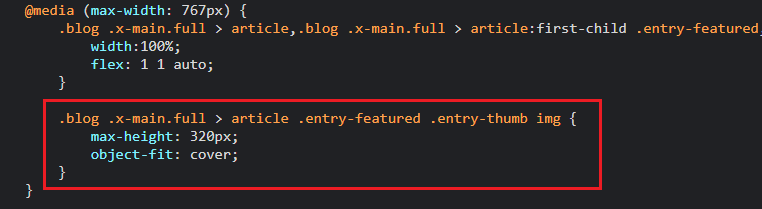
Thank you for reaching out to us. I checked your blog page and you’ve custom CSS which is cropping your featured images in small devices, please find and remove the following code:

image

This should fix the issue, let us know how this goes!

Dear Nabeel,

Thank you for having a look.

I’ve installed a Child Theme and use the Customize menu to make any CSS changes.
However, here I can’t see the code.

Are you able to tell me where to make this change?

Many thanks,

Hi Kelsey,

Upon checking the CSS, you can find it in the Pro > Theme Options > CSS.

Hope that helps.

Thank you.

Dear Marc,

Thank you very much for the response.

This is resolved the issue.

Many thanks.

Hi Kelsey,

Glad that we are able to help you.

Thanks

This topic was automatically closed 10 days after the last reply. New replies are no longer allowed.