Blog: display author and date of publishing

Hi,

My blog posts don’t show the name of the author and publishing date.

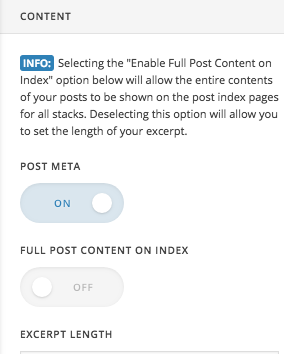
I was told to check Theme Options > Blog.
Nothing changed when enabling the metas.

I was also told to check these 2 links:


–> = not an option; want it to happen automatically


–> not sure how to start

Would love some help with this.

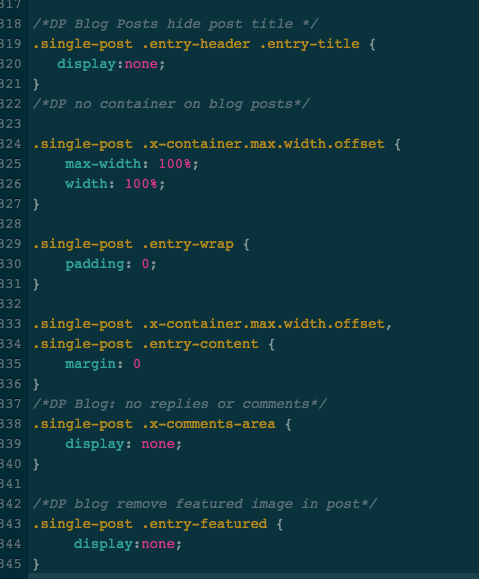
I needed to tweak the css already, because the blog posts weren’t showing up the way I wanted.
Maybe it’s a css thing?

I wish option 1 would just simply work. That would solve it. But maybe something is overwriting the functionality of this option?

Hey Kris,

The meta (which contains the author and publishing date) is there but it is hidden by a custom CSS (see secure note). Since we don’t have customization support, you will need to hire a third party developer to work closely with you to achieve your desired look or design.

Thank you for understanding.

Hi Team,

When I remove the line of code you suggest to change, nothing changes - still no author and date.
See https://youtu.be/AlEN-ClwFPM

I am able to do css changes myself. It’s just that I don’t know what to change. Your assistance is appreciated.

Hi,

You need to remove this code.

If you want to hide only the title, you can try this code instead.

/* hide post title */
.single-post .entry-header .entry-title {
   display:none;
}

Hope that helps.

Hi,

Unfortunately it doesn’t see previous message.
I now have replaced the code I had with your new code - WP Blog title is not visible which is what I want.
But still no author and post date.

Post meta = on

Hi,

I checked and can now see the post meta

See screenshot

Hi team,

Fair enough… but I was after author and date, remember?

Hi Kris,

Please clarify what you’re trying to do, Author and Published Date is part of the Post Meta, which are now showing on your blog posts.


Thank you,

This topic was automatically closed 10 days after the last reply. New replies are no longer allowed.