Block grid not aligning after theme upgrade

Hi.

I’ve just updated X to the latest version. But now it seems that something happened to block grids on several pages. I’m using similar code below for many pages around the site.

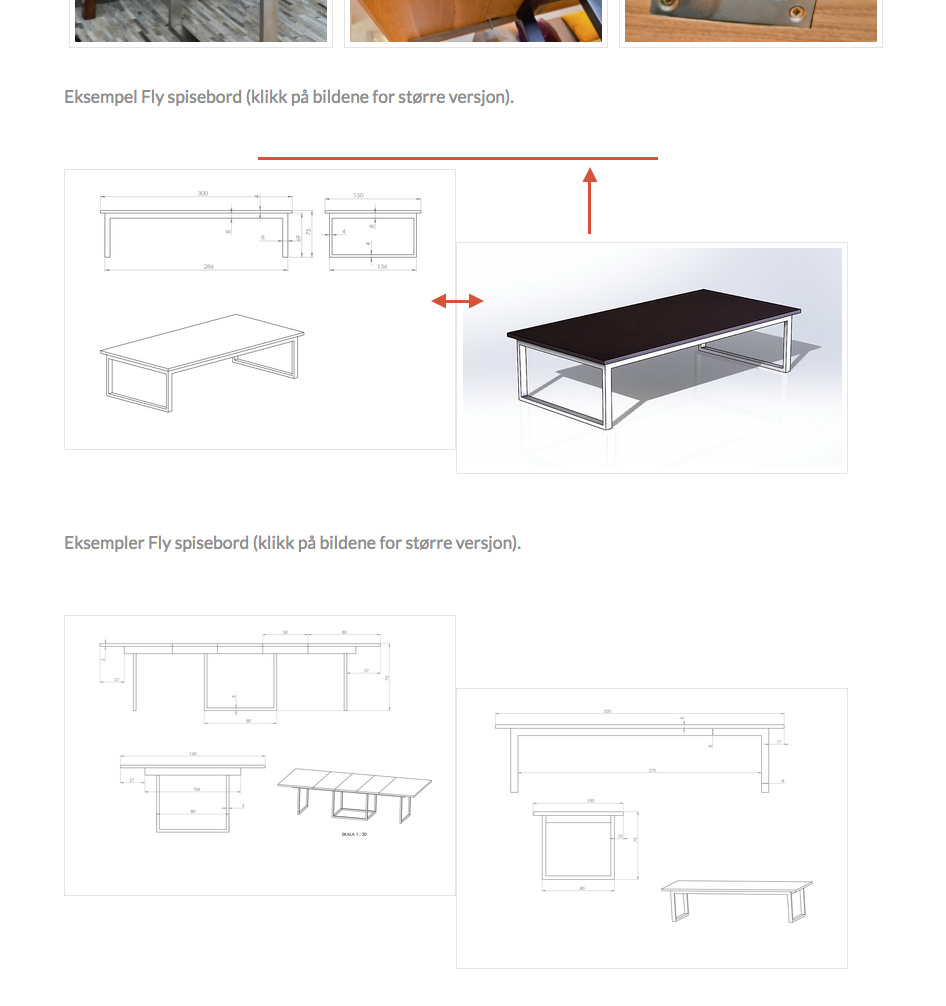
Please look at the attached screenshot. The text and pictures were aligned and with space between before upgrade.

For this page (https://brubakkenhome.no/produkter/spisebord/fly-spisebord/) I’m using the code;


Eksempel Fly spisebord (klikk på bildene for større versjon).

[block_grid type=“two-up”]
[block_grid_item] [image class=“my-portfolio” src=“http://brubakkenhome.no/wp-content/uploads/2016/12/fly-spisebord2-1.png” alt=“Eksempel Fly spisebord” type=“thumbnail” link=“true” href=“http://brubakkenhome.no/wp-content/uploads/2016/12/fly-spisebord2-1.png” title=“Eksempel Fly spisebord”] [/block_grid_item]
[block_grid_item] [image class=“my-portfolio” src=“http://brubakkenhome.no/wp-content/uploads/2016/12/fly-spisebord2-2.png” alt=“Eksempel Fly spisebord” type=“thumbnail” link=“true” href=“http://brubakkenhome.no/wp-content/uploads/2016/12/fly-spisebord2-2.png” title=“Eksempel Fly spisebord”] [/block_grid_item]
[/block_grid]

Eksempler Fly spisebord (klikk på bildene for større versjon).

[block_grid type=“two-up”]
[block_grid_item] [image class=“my-portfolio” src=“http://brubakkenhome.no/wp-content/uploads/2016/12/fly-spisebord.png” alt=“Eksempel Fly spisebord” type=“thumbnail” link=“true” href=“http://brubakkenhome.no/wp-content/uploads/2016/12/fly-spisebord.png” title=“Eksempel Fly spisebord”] [/block_grid_item]
[block_grid_item] [image class=“my-portfolio” src=“http://brubakkenhome.no/wp-content/uploads/2016/12/fly-spisebord3.png” alt=“Eksempel Fly spisebord” type=“thumbnail” link=“true” href=“http://brubakkenhome.no/wp-content/uploads/2016/12/fly-spisebord3.png” title=“Eksempel Fly spisebord”] [/block_grid_item]
[/block_grid]

[lightbox selector=".my-portfolio" deeplink=“true” opacity=“0.875” prev_scale=“0.75” prev_opacity=“0.75” next_scale=“0.75” next_opacity=“0.75” orientation=“horizontal” thumbnails=“true”]


Could you please look into this?

Thanks.

Regards Christian
Hi Christian,

Thanks for writing in! Upon checking, I can confirm the issue on your site and I see the styles are loading through WPFC (WP Fastest Cache). Could you please try purging your cache and also disable CSS minifications on the plugin settings and re-test your site again.

Let us know how it goes.
Thanks!

Hi.

Thanks for your answer.

I tried the suggestions you are mentioning. But unfortunately the problem persist.

Regards Christian.

Hi there,

It’s all because of line breaks. When you add a content in Wordpress, it will then convert the empty line breaks to HTML line breaks such as <p></p> and <br>, especially if you’re working on Wordpress default editor.

To prevent this, make sure to delete line breaks between shortcodes. Example,

Don’t

[shortcode]
[shortcode_2]Content

Here, and line breaks is okay within content, but not between shortcodes
[/shortcode_2]
[/shortcode]

Because it will be converted to this

<div class="shortcode"><br><div class="shortcode_2">Content<p>Here, and line breaks is okay within content, but not between shortcodes</p><br></div><br></div>

The <br> will cause misalisgnment.

Do

[shortcode][shortcode_2]Content

Here, and line breaks is okay within content, but not between shortcodes[/shortcode_2][/shortcode]

the result will be

<div class="shortcode"><div class="shortcode_2">Content<p>Here, and line breaks is okay within content, but not between shortcodes</p></div></div>

Thanks!

Hi.

Thanks for your quick reply!

I understand what I have to do. But I use similar code on very many pages. So unfortunately I have to do the changes all over.

It’s a bit strange. Because this woorked fine until the latest theme update.

Regards Christian.

Hi There,

Please try with this temporary solution, add this custom JS under Theme Options > JS:

jQuery('.x-block-grid > br').remove();

Hope it helps :slight_smile:

Hi.

Thanks a lot! That did the trick – and just saved me for a lot of work :slight_smile:

Regards Christian.

Glad we could help.

Cheers!

This topic was automatically closed 10 days after the last reply. New replies are no longer allowed.