Bg-integrity-1.png status 404

Hi,

I am having a problem like many others with the bg-integrity-1.png slowing down my load time. I have read through other feeds, and have gone into the Theme Option, changed the pattern background as well as re-uploading the file to where the location is looking for it in my files - I have also purged all my caches and I am still getting the error on my page.

I’m struggling to find how else to remove this error from my page, so any help would be appreciated.

Thanks,

David
Hi David,

Thanks for reaching out!

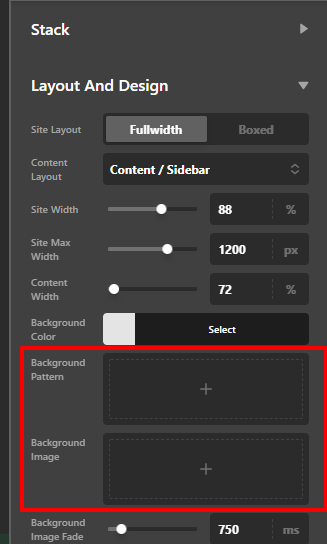
The given credential is not working but to remove the bg-integrity-1.png image, just go to Pro > Theme Options > Layout and Design then remove the background image or background pattern.

Hope that helps.

Thank you.

Great this worked a treat! I appreciate your help!

Hi David,

Glad that we are able to help you.

Thanks

This topic was automatically closed 10 days after the last reply. New replies are no longer allowed.