Hello, I have two separate websites that are both built using Pro X Theme. I created a page on Website A that I’d like to reuse on Website B. My goal is to duplicate the page structure and layout exactly as it is, then modify the template and content slightly to fit the second site. What’s the best way to export a single page from one X Theme site and import it into another? Thanks in advance for your help!
Hello @Jennine,
You can use Pro’s Template Manager & Design Cloud. This method allows you to save the entire page layout (sections, columns, elements, and styling) from Website A and then load it into Website B. It’s clean, efficient, and preserves your structure perfectly.
On Website A (The Source Site):
- Edit Your Page : Go to the page you want to duplicate and open it in the Pro Editor .
- Save as Template :
- In the Pro editor, look for the template icon (it looks like a book or a page) in the top toolbar, usually located in the header of the editor interface.
- Click “SaveTemplate” .
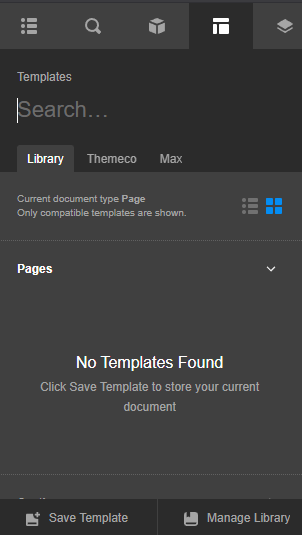
- Give your template a clear name (e.g., “Landing Page Layout - Project X”). This saves the design locally to your site’s Template Manager.
[Steps re edited]
Best Regards.

Hi @Jennine,
Hit the “Download” button to download the template file. In your other site, you can import this file and allow you to start the page using this template.
Thanks.
This topic was automatically closed 10 days after the last reply. New replies are no longer allowed.