Best/Easiest Way to change how columns display in smaller device

Hello,

What would be the best way to target all 4 column display, for exemple, to break into two columns, before it breaks into 1 column on the smaller devices, – if one wants to change that on all 4 column display across all pages.

Would I put On the CSS accessible from the cornerstone options, or on the CSS accessible from the individual pages? And what class should I target?

While I am fluent in CSS - quite new to this theme.

As a side question, using CSS - I am using a child theme, when I change the CSS from the cornerstone option section, this seems to actually add everything into the tags within the header. I thought it would change it within the Child theme’s CSS? Where would I put the CSS custom code, if I don’t want it to fill the header of every page, but instead be loaded in the Child CSS (to over-write the Original Theme CSS)?

Similarly, when I change the CSS via cornerstone, while editing an individual page, where is this CSS added? and again, if I want the CSS changes I am making on one page to apply to the entire site, where should I put it?

Hope this makes sense.

Hello @NuConnect,

Thanks for asking. :slight_smile:

  1. Two column in mobile: You can add a custom css class to the column under Customize > Setup > Class. Please make sure to assign same Class name to the four columns. After that Add following CSS under X > Theme Options > CSS:
@media only screen and (max-width: 600px) {
    .Column-layout {
    width: 45% !important;
    float: left !important;
    margin: 5px;
}
}

Please make sure to change the class name Column-layout as per your requirement.

  • To add CSS you can either add into the theme options panel under X > Theme Options > CSS or inside child theme style.css file. If you want to make changes for a specific page then you can add the CSS code in the page CSS editor. However, for global level styling, you can either add in Theme Options CSS editor or Child theme style.css file.

If you would like to learn CSS, I am sharing few resources that you take a look to get started with CSS and an interesting tool that you can use to speed up the development process.

I recommend you to watch following video that will help you to get started with CSS.

https://www.youtube.com/watch?v=MFR4WXiLzpc

Sometimes it can get a bit difficult to find out the right selector to be able to write the required CSS codes. A handy tool that can help you in this is Google Chrome dev tools. I am sharing the resource that you can refer to get started with dev tools.

https://developers.google.com/web/tools/chrome-devtools/css/

https://developers.google.com/web/tools/chrome-devtools/

https://www.youtube.com/watch?v=tP_kXBJWPhQ&t=200s

Thanks.

Cool. Thanks for the replies and resources.

I am pretty familiar with CSS coding. Just not so much with this theme and working off a child theme.

So let me ask one last question on that topic:

1- Am I mistaken to think that anything added in the CSS under X > Theme option is added into the "head>style tags of all my pages?

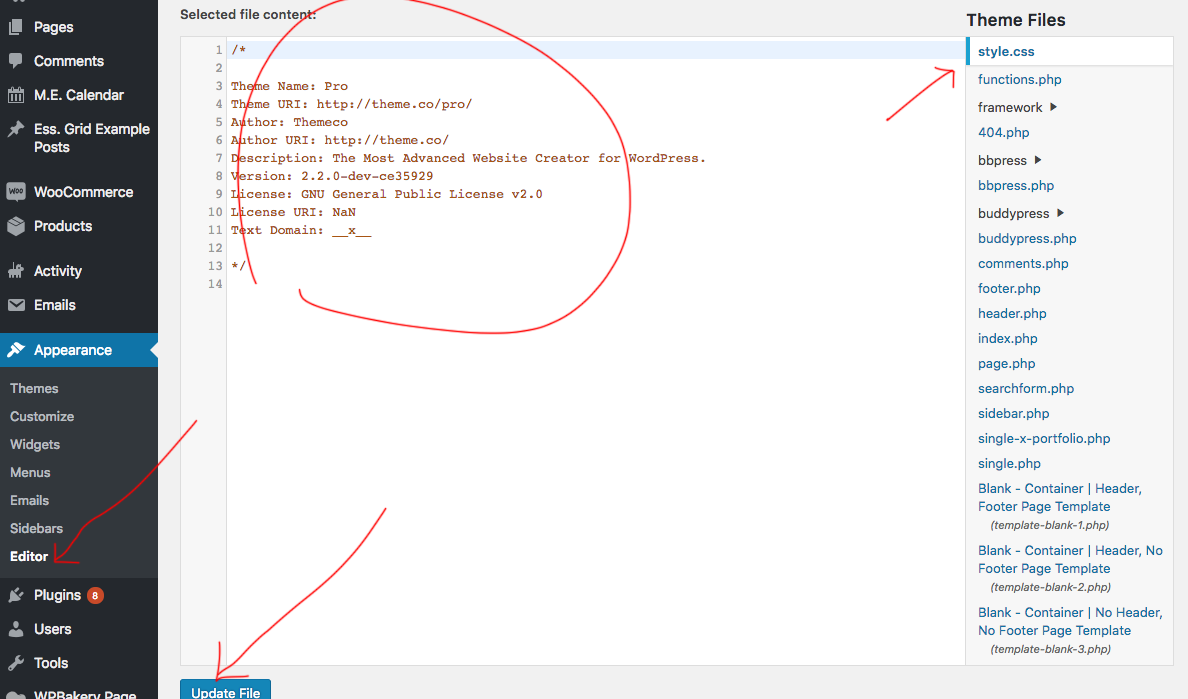
2- To modify the CSS of my child theme, do I have to do it outside wordpress completely and then upload it. Or is there a place within the theme or wordpress when I can actually write into the CSS of my child theme.

Thanks again for your help.

Hi There,

Thanks for writing in!

1- You are right the style will come in a header of every page.
2- You can edit the CSS file Via theme editor if WordPress.

Hope this helps!

Very helpful - Thanks for this information/confirmation.

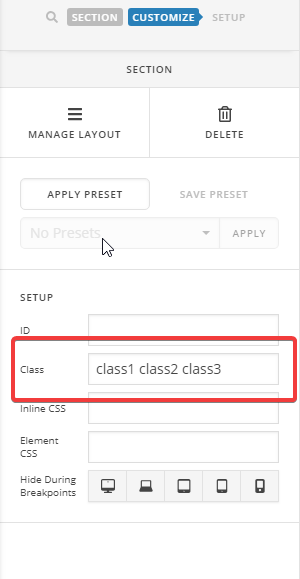
This opens one more question! When I am in cornerstone editor, editing a certain page, in the customize tab, am I able to add more than one custom class? If so, do I leave spaces in between the classes as I would in HTML (though without using “.”)?

Thanks!

Hi There,

Yes. You can add more custom CSS classes.

Something likes this:

Hope it helps :slight_smile:

Amazing :slight_smile: . Thanks for the great support!

Glad we could help.

Cheers!

This topic was automatically closed 10 days after the last reply. New replies are no longer allowed.