Basic Settings and Main Menu Layout Issue

In the development site I’m using Pro with the Integrity layout and the standard Header and Footers (not custom Build versions).

  1. The global primary active link color is Red. Where exactly is this setting as I need to change this please as well as the sidebar link colors?

  2. CSS adjustment needed please to reduce the space/padding above a Blog Post or Page Header and the top of the inner page/post border.

  3. CSS adjustment needed please to increase the space/padding BELOW the main navigation Bar/breadcrumb bar and the top of the inner page/post border.

  4. The Main Navigation Bar Height where the main navigation elements are in a horizontal layout, seems to be displaying over the Breadcrumbs Links and Bar.

  5. The Main Navigation Bar area - can just this background color be changed?

Thank you
Hi @razormicro,

Thank you for reaching out to us.

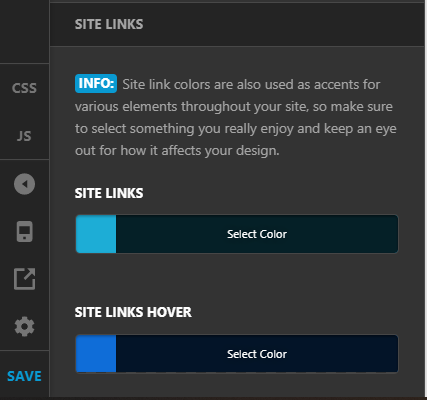
  1. You can change the site links color via Theme Options > Typography > Site Links:

image

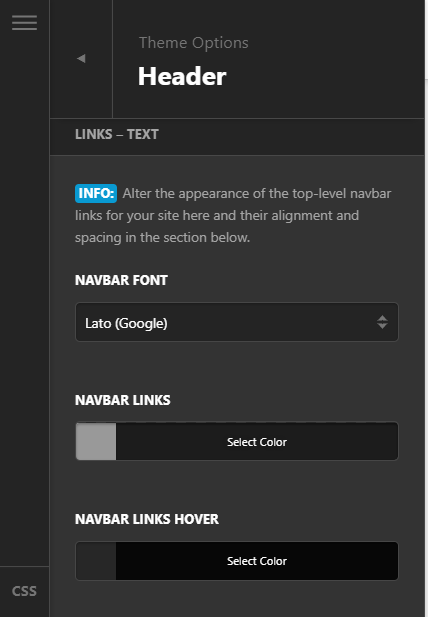
If you’re finding an option to change the Navbar links colors too then you can find these settings under Theme Options > Header > Links - Text:

  1. This would require custom CSS which is regretfully outside of our support scope, but we will do our best to help you in getting started with the customization. To reduce the space above and below the page containers, you can add the following code in the Theme Options > CSS:
.x-container.max.width.offset {
    margin: 15px auto;
}
.entry-wrap {
    padding: 20px;
}

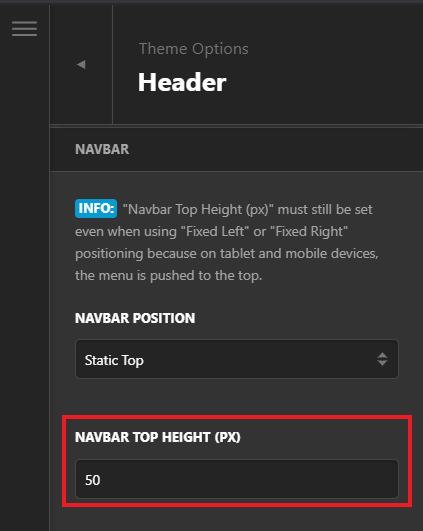
3 & 4. Please navigate to Theme Options > Header > Navbar > Navbar Top Height (px) and set it to 50 or higher as needed:

  1. For the navigation bar background color you can follow Navbar color change

Please note that the custom code provided above changes the default behavior/display of the theme, you will be responsible to maintain or update the code in case you require further changes or if the code stops working in future updates. If you are uncertain how to proceed, it would be best to get in touch with a developer.

Hope this helps!

Thank you, that worked well.

You’re welcome, @razormicro.

This topic was automatically closed 10 days after the last reply. New replies are no longer allowed.