Bar Chart layer loses color when live

I’ve had a bit of an issue with using a Global Color on the fill of the bar chart, so I ended up using a HEX value instead (of global color). That seemed to work in cornerstone.

But then on the frontend, the background color completely disappeared when we went live with the page. So it previews in cornerstone, but doesn’t display on the front end.

I figured I’d just add in some CSS to fill in the color… but then I noticed that the HTML isn’t even rendering on the frontend!

Cornerstone Builder:


Live:


https://bradleyairport.com/#findparking

I also noticed that the HTML isn’t even showing on the frontend:

That login didn’t actually work for me. I see what you mean about global colors not working in charts in the builder, however what does work for me is that the global colors work in the frontend page. I will have a fix in place for Pro 6.9.2.

@Charlie… sounds like you’ve already got a handle on it. I updated the password just in case.

Hey @splaquet,

Let’s wait for the patch update. @Charlie will be releasing it soon.

Cheers.

I updated Pro today. while Global Colors now work, it’s still not pulling the second/background color layer. I’m not sure if it matters, but the second layer is not a global color.

I released an update to Cornerstone Charts as well. Can you let me know if the issue persists after updating that too?

I just caught the Charts update. I updated it and flushed everything… still a no go on frontend. still appears perfect in Cornerstone, but doesn’t display on the frontend.

I downloaded and tested this today.
Pro: 6.9.2
Charts: 1.2.7

I observed the following:

  • if I change the color of a data point in the chart element directly, global colors are displayed in Cornerstone
  • if data sets are created by a looper and the chart pulls the color via dynamic data i.e. from a list parameter, global colors are not displayed in Cornerstone (but in frontend it works for me)
  • additionally: chart’s colors in general do not support light-dark()

But as far as I understand it seems @splaquet has the opposite problem: Cornerstone displays the colors, but not the frontend :thinking:

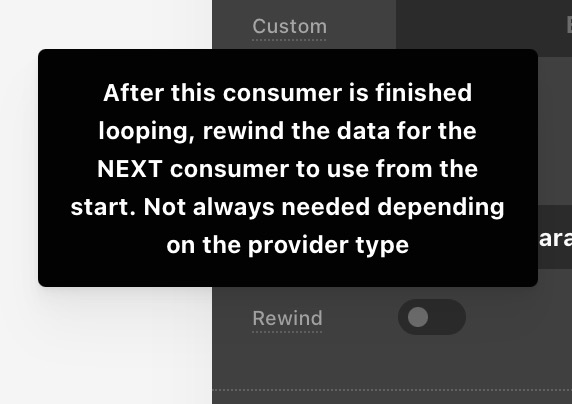
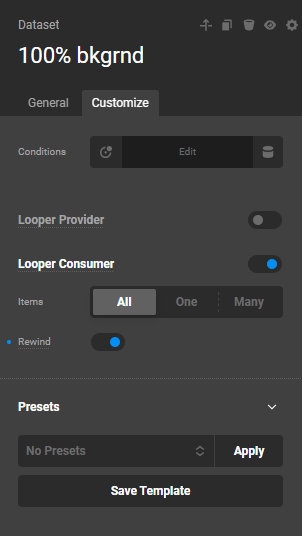
@splaquet Have you tried using Looper Rewind? Do you have a staging version of this site?

@raye I’ll have to try your 2nd point later. light-dark() and other advanced CSS things like gradients are not supported by the Chart library we use. We will eventually have to create a more advanced color mapping system for this.

1 Like

to be honest, I can’t figure out what Looper Rewind is. I haven’t known what it was and I can’t find any documentation on it… so no, I have not tried it.

I can migrate this site over to a staging site. the challenge is that it’s on AWS and has some seriously tight permissions. I can set it up if access via frontend & dashboard would help. but other than through plugins, I can’t provide access if you’d need backend access (ssh, sftp DB, etc).

I just read on rewind. I’m not sure if that’d matter, as the second color is actually hard set with a HEX color (not another global color)

image

Hello @splaquet,

Just enable the Rewind option in both Looper Consumers.

Think of the “Rewind” option as a way to “reset” the loop for a specific Consumer. It is most useful in complex layouts where you need to re-use the same data multiple times for different display purposes. For simpler, single-iteration loops, it should remain disabled to avoid duplication.

I hope this explanation helps you. If you can share more about the specific layout you’re trying to build, I might be able to offer more targeted advice.

Check out the demo I have created in the test URL in the secure note below.

Thanks.

that was it. Looper Rewind did the trick!

as always, thank you so much for your help :smiley:

1 Like

You are most welcome, @splaquet

This topic was automatically closed 10 days after the last reply. New replies are no longer allowed.