Background Video Size and Position

Hi Guys,

I’m trying to figure out how to adjust the relative size and position of a background video in my header…

This is the URL: https://pmtvideo.com/

You’ll notice the video overflows (vertical and horizontal) and seems to anchor on the left, instead of centering and resizing along with the screen size/ratio - I’m aware at some sizes/ratios there might be vertical or horizontal ‘bars’ but how to I prevent it from overflowing either direction? Is it in the Dimensions editor for the Bar?

Thanks for the help - Hope you’re staying healthy.

Hi @jonathanrockett,

Thank you for writing in, unfortunately, background-video is not going to work on what you’re after. You need to place your video as a Video element that takes up the entire width of the bar.

You need to set the Bar’s height to auto, with 0 Outer Spacing. Then Container will Self flex option will be set to Fill Space


Cheers!

Thanks @friech ! That was really helpful :slight_smile: I’ve got it how I want it now, including keeping the menu (Bar 3) sticky at the bottom until scrolling down…
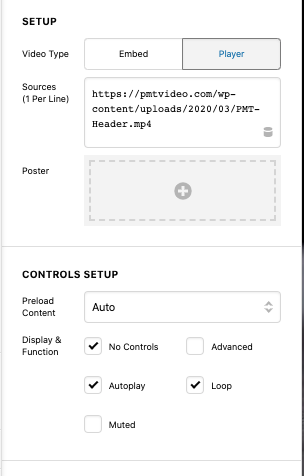
My last question is related to the video element player controls: I want it to autoplay and loop, with no player controls (it’s just a silent splash header video). I have those settings selected, but I’m noticing you have to click on the video area to start it playing.

Any idea why it’s not actually autoplaying?

Thanks again!

Screenshot 2020-03-31 11.36.59

Hey @jonathanrockett,

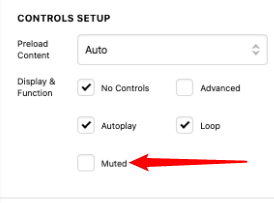
Modern browsers will not autoplay a video if it’s not muted because that is bad for user experience. Try muting your video. I understand it’s a silent video. But, it should still be muted.

image

Hope that helps.

Aha! So simple… I didn’t think of that, because I assumed that since there was no sound to begin with it would still auto play…

Thanks so much!

You’re always welcome @jonathanrockett!

Cheers.

This topic was automatically closed 10 days after the last reply. New replies are no longer allowed.