Background Color - Fullwidth - Text in Container in HEADER

I had posted a question about having a fullwidth background color for a text element inside a container.
I solved that by using the Row element.

However, I’m not sure how to solve for it when I’m working in the Pro headers.

The page title has an orange background color to illustrate what and where I’m trying to do this.

That orange color should stretch full width on the hero image, but not losing the boxed nature of the page title (constrained to 1440px).

Any thoughts on how I can do this inside a header.

I’ve put URLs into the secure note.

Thanks
Hi @wbgTHEMECO,

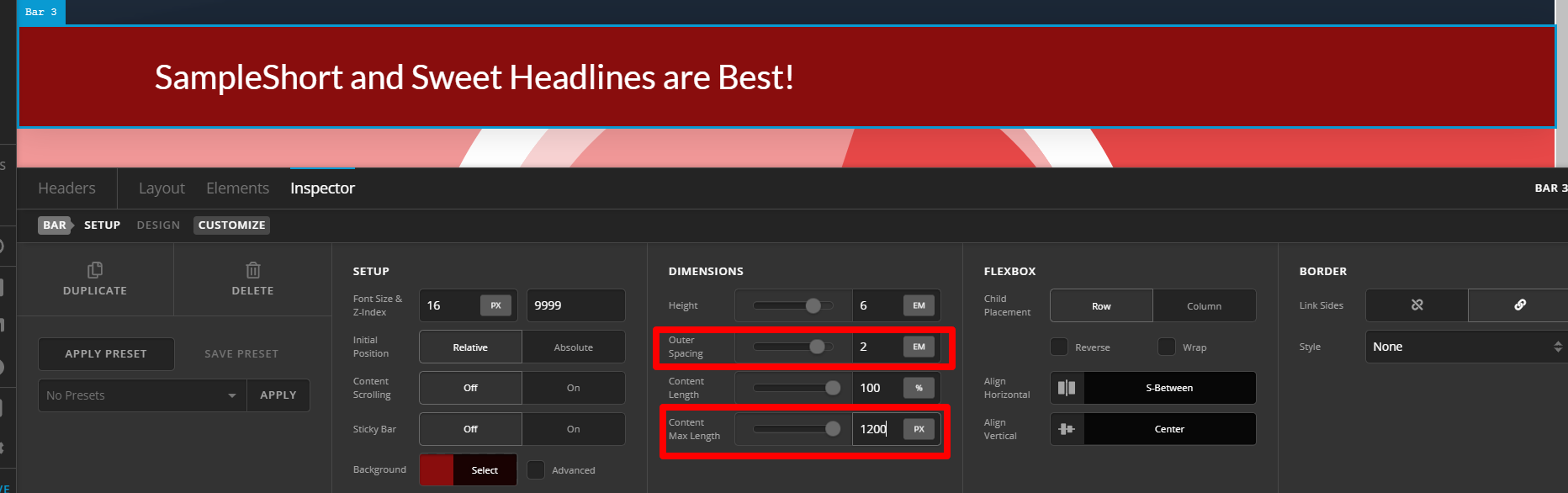
I don’t see that part on the pages you shared. Although, to achieve this on Pro header, background color should be added on BAR. Then you may or may not set CONTENT MAX LENGTH. See below where I added red background with a headline in it:

In case you did not set CONTENT MAX LENGTH, you can see a little space around left and right and that is the OUTER SPACING set on BAR.

Hope this helps.

This topic was automatically closed 10 days after the last reply. New replies are no longer allowed.