Assign fonts locally in header and footer

Hi,

I want to load fonts locally into the header and footer on this site instead of using Google Fonts or Adobe Type Kit.
https://www.dangerpress.com/

I’m using the plugin Add Any Font and assigning them to the elements I’ve created in the header/footer of my site but the fonts are not loading.

https://postimg.cc/30wX8V4W

Is my nomenclature wrong in the above menu or is there a better way to load the fonts locally to work with X’s header and footer?

Best regards,

J
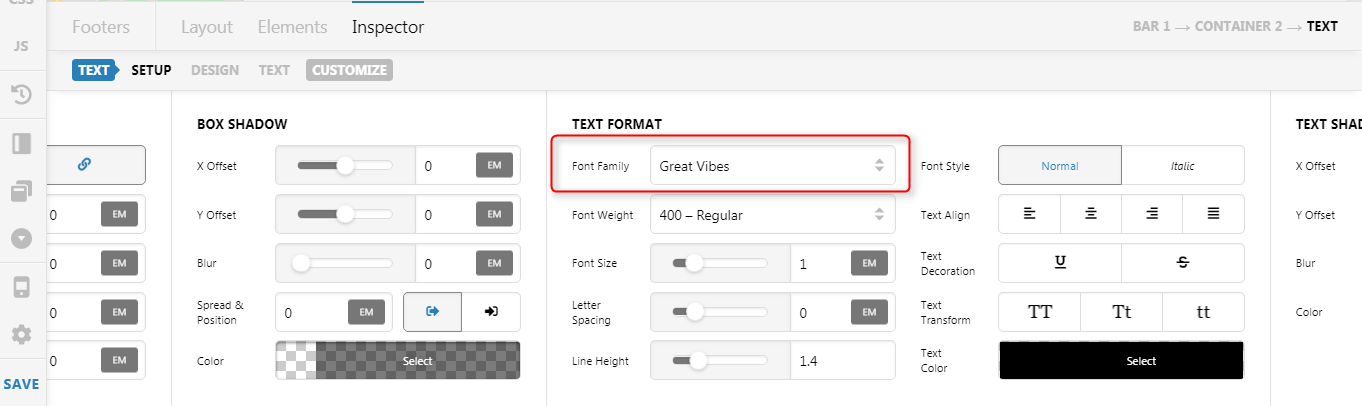
Hi Jhaysin,

Thank you for writing in, but sorry we can’t provide support for 3rd party plugins, due to the fact that there is simply no way to account for all of the potential variables at play when using another developer’s plugin or script.

Here’s how you upload a custom font on the Font Manager instead.

Thank you for your understanding,

Thanks Friech, that worked for desktop but mobile now displays different fonts incorrectly after switching them to custom fonts.

Hello Jhaysin,

We highly recommend that you use our Font Manager instead. With the Font manager, you can also upload the custom font and apply it to the elements in your site in X > Theme Options > Typography.

We do not have any experience in using the 3rd party plugin Add Any Font. In your case, you may need to supply the “Custom Elements” field. You just have to find out the class of the element.

Just to manage your expectations, this isn’t specifically a theme issue, but rather, your customisation of it with 3rd party plugin. So whilst I have happily provided you with some guidance above on how to get it working, we cannot provide theme customisation as a general rule, or support custom code solutions provided. Therefore, you might find it helpful to check out the following:

CSS Selector Reference
How to find the css selector in chrome

Hope this helps.

That RueNel

I added the font I’m using, Termina, to the Font Manager as well as in the Footer CSS. It’s still displaying incorrectly. Bottom left in the footer on this page. https://dangerpress.com

Font Manager setup


Footer CSS

Displaying like this in Chrome and Brave

Should look like this

Hi Jhaysin,

I see you added your “copyright” text on a Content Area element, please use the Text element instead, and on the Text element’s Font Family dropdown choose the “Termina” (your custom font)


Basically, this is how you use the Font Manager, not with a custom CSS.

Happy holidays,

Thanks Friech.

That worked for the footer.

In my header, I’m using a font (Presicav) from the Font Manager with the Navigation Inline element that is not working on Windows 10 machines. They show correctly on iOS and Mac browsers, but do not load on Windows 10 machines.

Here’s how I’m using it
https://postimg.cc/rdXW80dN

https://postimg.cc/BLDNN9rJ

I’ve been unable to get .woff and .woff2 to be recognized by Wordpress’s Media Library when selecting through the Font Manager, otherwise it shows up
https://postimg.cc/tYSqpLcq

Using .ttf file
https://postimg.cc/t182hCmr

Hello Jhaysin,

You are having a CORS or Cross Origin Resource Sharing issue.

Access to font at 'https://dangerpress.com/wp-content/themes/pro-child/fonts/crimson/CrimsonText-Regular.ttf' from origin 'https://www.dangerpress.com' has been blocked by CORS policy: No 'Access-Control-Allow-Origin' header is present on the requested resource.

You will have to resolve this making sure that your WP dashboard url is the same as your site URL. See example below:

To get this CORS issue resolved, please check out this link:

Thanks again RueNel.

I had my WordPress Address and Site Address matching the dashboard URL, but I found the answer in the CORS article link you gave me. I didn’t have www. in the domains of the fonts I was calling in my global CSS. Added that and now the cross origin resource sharing issue has been resolved.

We’re glad that the issue is now resolved, Jhaysin.

This topic was automatically closed 10 days after the last reply. New replies are no longer allowed.