Archive page + CS form with error using a loading area element

I’ve got an archive page that is working fine in Firefox, and having issues in Chrome. I’ve made sure that I have everything updated and all the browsers current.

When I visit the page in Chrome I have a couple issues happening:

  1. the div that contains the loading area element, is showing up and blocking the content of the section from being accessible.

  2. If I manual hide that div, and click into the modal, the CS form doesn’t show up inside the modal.

Can you let me know if I am missing something simple on this?

Here is what I see in firefox when clicking on the modal toggle.

Here is what I see when I visit the page in Chrome


Hello @paulbcurious,

Thanks for writing to us.

To help you with your concerns, we need to check your settings. I would request you please share the admin login details meanwhile I would suggest you troubleshoot a few of the common issues before we investigate your settings. Please share your details in a secure note. Please provide the following details

  • WordPress Login URL
  • Admin-level username and password

You can find the Secure Note button at the bottom of your posts

Thanks

Hello Paul,

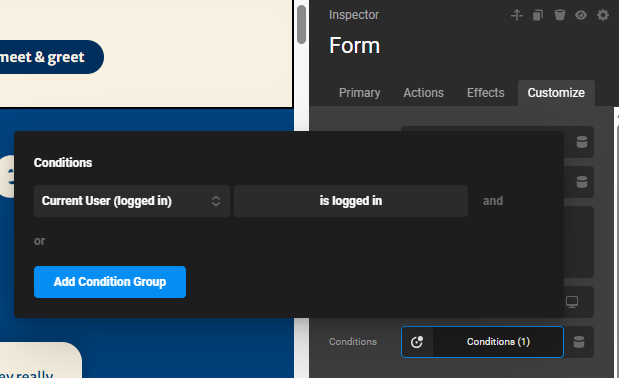
Kindly remove the condition first added to the Form element:
image

This condition SHOULD be added to the ROW element container instead, so that when a user is not logged in, the whole ROW will not be loaded into the page. I also advise disabling the Dynamic Rendering in the Modal element and testing the page again.

Actually, I am confused because when I first open the page while NOT logged in, I only see the blank modal.

Best Regards.