Archive layout on Category not iterating

I have a layout, assigned to the document type “HPS Document”. These documents have a category of “47” meaning edition 47. There are 11 documents assigned to category 47. My archive layout pulls back 11 items. Some of the items change correctly, some don’t. The same author on all, but the item URL and title changes.

See green=good and red=not good.

Not sure if there’s something I should be doing to retrieve the values of each item in the consumer, or whether the provider isn’t working.

Bill.
Hello Bill,

Thanks for the very detailed post information. Regretfully we cannot view the site. Do we need to edit our host file or use VPN? Please check out the secure note below.

In the meantime, please edit your Archive Layout and remove your Looper Provider. Actually, custom archive layouts do NOT need to have a Looper Provider. An archive has already its own loop. We just have to consume it in the builder so we only need to have a Looper Consumer.

Best Regards.

Many apologies, there was an extra h in the URL, now removed. Bill.

PS There’s no Loop provider in the archive layout, I realise that’s not required. Bill

Hey Bill,

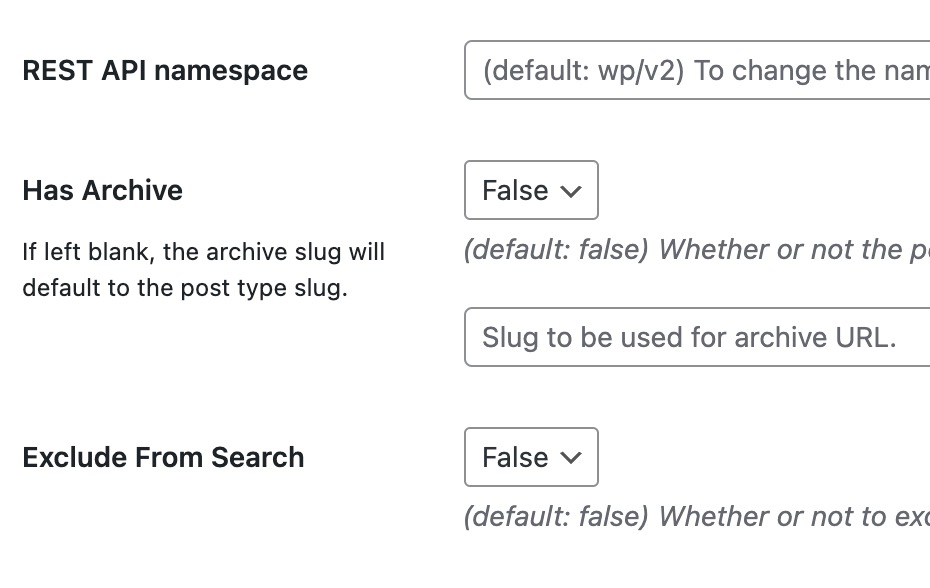
I have inspected your layout and I found out that you have turned OFF the archive when you created your custom post type in CPT UI.

Set it to “True” so that it can be displayed by the Builder:

Best Regards.

Thank you, a useful tip. But right now, the same output is occurring. I’ve checked the assignment, and using this URL for testing, produces the same result, even with Has Archive = True.

https://devhps.site/hps_edition/47/

:frowning:

I made myself a CPT from scratch, added data and a taxonomy, and then an archive layout. Which worked fine. I guess I should probably delete my content, re-create the CPT from scratch and see if that works.

Hi Bill,

Glad that it works. Please let me know if you face any further issues after recreating CPT.

Thanks

This topic was automatically closed 10 days after the last reply. New replies are no longer allowed.