Hello! On this page under “Our Clients” the Architecture Portfolio’s rows don’t have the same spacing after the first block, I’ve tried adding a gap and that hasn’t corrected the appearance. How can I ensure the spacing between rows is consistent? Thank you for your help.
Hi Mary,
Please kindly click on one of the items that do not have margin and then from the left section of the screen select the column settings which the element is in:
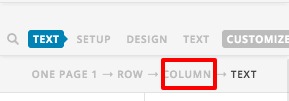
Then please kindly add top padding of 2em, and you will have an even spacing:

Kindly do the same for all the items that are not evenly spaced.
Thank you.
That corrected the middle row, but not the 3rd row. Is there something else I can try?
Hello Mary,
Please edit the page back in Cornerstone and click your section settings. Find the “Customize” tab and update the element css:
$el .x-container:not(:first-child) .x-column {
    margin-top: 2rem;
}
If ever you cannot find the custom css, please provide us the access to your site so that we can correct it.
Regards.
Alright, I did, but that didn’t result in any change. Can I try something else?
Hi Mary,
Please try @Christopher solution again, but this time, add the 2em to the top margin as well. The padding only add spaces to the content, and it’s margin that gives spaces in between items.
The CSS provided by @Ruenel should work, but it appears its now on single section where first child applies to single row. And make it invalid for other rows.
Thanks!
I got it, thank you!
You are most welcome. 
This topic was automatically closed 10 days after the last reply. New replies are no longer allowed.