Arabic brokes up the site

Hi!

I have a problem. I added a language and the whole theme on that page gets broken:
http://box5747.temp.domains/~vvafi/ar/
It change the whole page other way around. I don’t want it change anything. I can just add the test in the opposite. How I can fix that? If you see other tree languages they are working well.

Hi There,

I could see there is a Javascript error in your website, please find this custom JS:

jQuery(document).ready(function($) {
	var max = 0;
	$(".equal-height .x-column").each(function(index, el) {
		if( $(this).height() > max ){
			max = $(this).height();
		}
	});
	$(".equal-height .x-column").css('height', max);

And change to this:

jQuery(document).ready(function($) {
	var max = 0;
	$(".equal-height .x-column").each(function(index, el) {
		if( $(this).height() > max ){
			max = $(this).height();
		}
	});
	$(".equal-height .x-column").css('height', max);
});

Hope it helps :slight_smile:

Hi! Is this really the right answer for my question?

Hi Anni,

Sorry for the confusion!

  • May I know how it was translated? It should be translated through the builder and not with string translation manager. I assume it was translated this way https://www.youtube.com/watch?v=TmmyU6MtXY8. Where it only search visible strings and replace it. And it was not really translated within the builder before. And it seems like it based on the existing old content.

  • Please also try testing a plugin conflict. You can do this by deactivating all third-party plugins, and see if the problem remains. If it’s fixed, you’ll know a plugin caused the problem, and you can narrow down which one by reactivating them one at a time.

  • If it still doesn’t help, would you mind providing us with login credentials(by clicking on the Secure Note button at the bottom) so we can take a closer look? To do this, you can make a post with the following info:

    • Link login to your site
    • WordPress Admin username / password

Thanks.

Hi!

I have checked all the plugins and no effect. As I am using Cornerstone, I have always duplicate the page and then translated in Cornerstone.

I will give you the credentials. Thank you for helping me.

Hello Anni,

You have Endurance Page Cache installed. Please clear the cache and temporarily disable it. You can do that in Settings > General > Endurance Page Cache. After making it is cleared, you can test your site again.

Right now I am still seeing a JS error because of the broken JS code. If you already have updated it as what have suggested by @Thai, then most probably it is a caching issue.

Hope this helps. Please let us know how it goes.

Hi!

I forgot to ask that where I can find the custom JS. I haven’t add anything and I don’t know JS. Any idea where I can search for that?

I put the coach “off”. No change by only doing that.

Hello @Anni,

The custom JS were added in Cornerstone’s custom page JS code section.

You will have to edit the page in Cornerstone and insert the correct JS code as provided by @thai

Hope this helps. Kindly let us know.

I have now added the JS code (there wasn’t anything, so not “changing”, I just added) to the Global JS.

The page looks better but the navigation in the arabic version is other way around.

Also, there are some problems with column padding. If I open Cornerstone, I can see the padding it there correct but show it wrong. The Cornerstone content is also from left to right so it is damn hard to use.

Hi Anni,

I’m not sure what you mean, the navigation in Arabic version is in RTL, the logo is coming from the right, then navigation, then flag icons. And if it’s about navigation items, the Asiakkaat is coming from the right which is Customers in English version.

And the builder will follow the same direction, right to left (if you’re referring your right screen monitor as left, then it’s left to right which is still correct).

Could you clarify the issue you’re getting by providing visuals with arrows pointing to the issue?

And in padding issue, it must be changed manually to match the direction of the layout. If padding is added on left on English version, then it must be applied to right on Arabic version. And maybe the current options are confusing since Advanced mode is inactive. Please open you page in arabic and toggle on the Advanced mode.
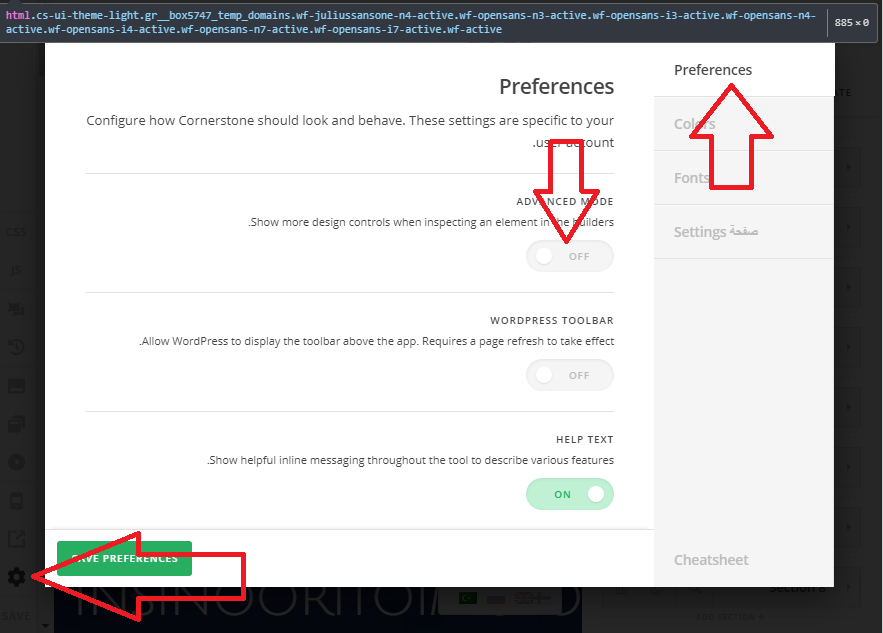
And please remove the javascript, it’s incomplete and cut in the middle. It’s not gonna work.

Thanks!

Hi!

But I don’t want that the logo is on the right on the navigation. It looks very weird. Is there a way to keep it on the left?

As I said, I have added the JS code. The field was empty, so I couldn’t “change” I just added the new one. Do you still see the JS error? If yes, what code I should use? I have now used this one:
jQuery(document).ready(function($) {
var max = 0;
$(".equal-height .x-column").each(function(index, el) {
if( $(this).height() > max ){
max = $(this).height();
}
});
$(".equal-height .x-column").css(‘height’, max);
});

Hi Anni,

The javascript seems to be okay now, about the logo, please add this CSS to Theme Options > CSS

.rtl.x-navbar-static-active .masthead-inline .x-brand, .rtl.x-navbar-fixed-top-active .masthead-inline .x-brand {
    float: left;
}
.rtl.x-navbar-static-active .masthead-inline .desktop .x-nav, .rtl.x-navbar-fixed-top-active .masthead-inline .desktop .x-nav {
    float: right;
}

Hope this helps.

Thank you, I finally get it working :slight_smile:

You’re welcome!
Thanks for letting us know that it has worked for you.

This topic was automatically closed 10 days after the last reply. New replies are no longer allowed.