Applied Template to new page - fonts are smaller

I worked on a template on my homepage, and then I saved it to my library (as a full page, not as blocks).

Then I went over to a new page and rolled out this template. The problem is all the headings became smaller. I checked that they are both loading the same container settings (No Container, Header, Footer). Not sure where else to check to get this consistent.
Hi there,

Thanks for writing in.

Please provide the two URLs, I like to compare the original and the clone too. Or maybe you have custom CSS?

Thanks!

hi there - here is the first page: http://spaghettilab.net/
and the clone: http://spaghettilab.net/about-us/

Hi there,

I have checked the pages and the heading elements of the About Us page seem doesn’t seem to have the responsive text classes added to them.

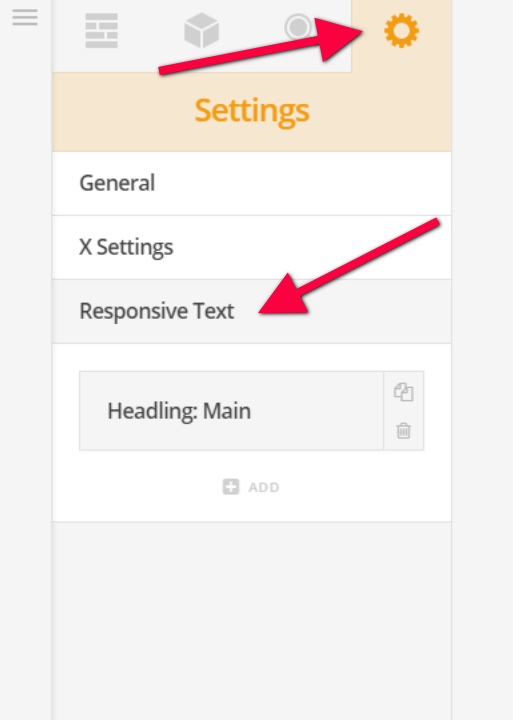
Please check the Responsive Text settings in the about us page and check what is the class name assigned to it and add it to the class field of the headline elements.

Ok I checked the page and found there were no responsive text classes set up. On the home page there are a series of them (as the page was created off one of the demos). It would be laborious to set these on every new page I create. What do you suggest is the best strategy for this problem?

Hi There,

You can use the Responsive Text shortcode instead, its the same thing you still need to configure its selector, compression, max-size, and min-size. But this is a shortcode which means you need to place this on a RAW content element or Text element on the bottom of your page as part of your template.

Cheers!

i can see that this works - but it’s not a fantastic strategy because if you want to update all these pages at once you would have to go into each Raw Content module and change the style. That being said, I would chalk this up to my poor understanding of the system and why this needs to be done in the first place. It will work for now though, thank you.

You’re welcome.