Anchor Links are Different than Links to Other Pages

Anchor links on the main header menu are fixed at a colour and “Job Listing” which is linked to other page is different. I want to make the colour to be the same as “Job Listing” including the mouse over colour too.

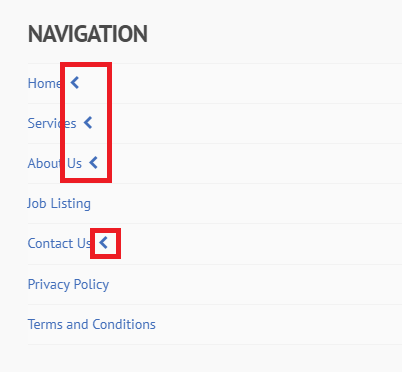
It happens on the footer menu too, which Anchor links will display an arrow and different page links are without the arrow. Can the arrow be removed?

URL: https://linkgap.com.sg

Hi There,

Thanks for writing in!

This is seems a known issue for one page menu. Please refer to this thread for a possible fix.

Hope this helps!

I have followed this, it does solve the color issue but the anchor is not working. Is there something i am missing?

Hey @plusstorm,

You have a custom script in your Global JS that is causing the issue. Please temporarily remove your custom JS and check if the issue persists.

Regarding the original issue (menu highlight color), that happens if you’ll use absolute or full URLs in a One Page Navigation setup. The solution for that is to duplicate your One Page Navigation menu and only use the hash and ID only. Assign this menu to your page. Then, set the menu using the absolute URLs as your Primary Menu.

Thanks.

Thank you for your support!

You’re welcome!
We’re glad we were able to help you out.

This topic was automatically closed 10 days after the last reply. New replies are no longer allowed.