Alignment of product option on single product page

Hi, I’ve added in a product option ‘Fast Track Repair’ on the WooCommerce site I’m doing, but I’m having trouble aligning the checkbox options - they’re appearing under the label but I’d like them to be to the right of them in line with the other product option dropdown above. I’ve tried to add some CSS but it hasn’t done anything! Would you mind taking a look for me please!

I’ll put the URL in a secure note as the shop isn’t live at the minute.

I’ve done a rough mockup of how I’d like the options to align.
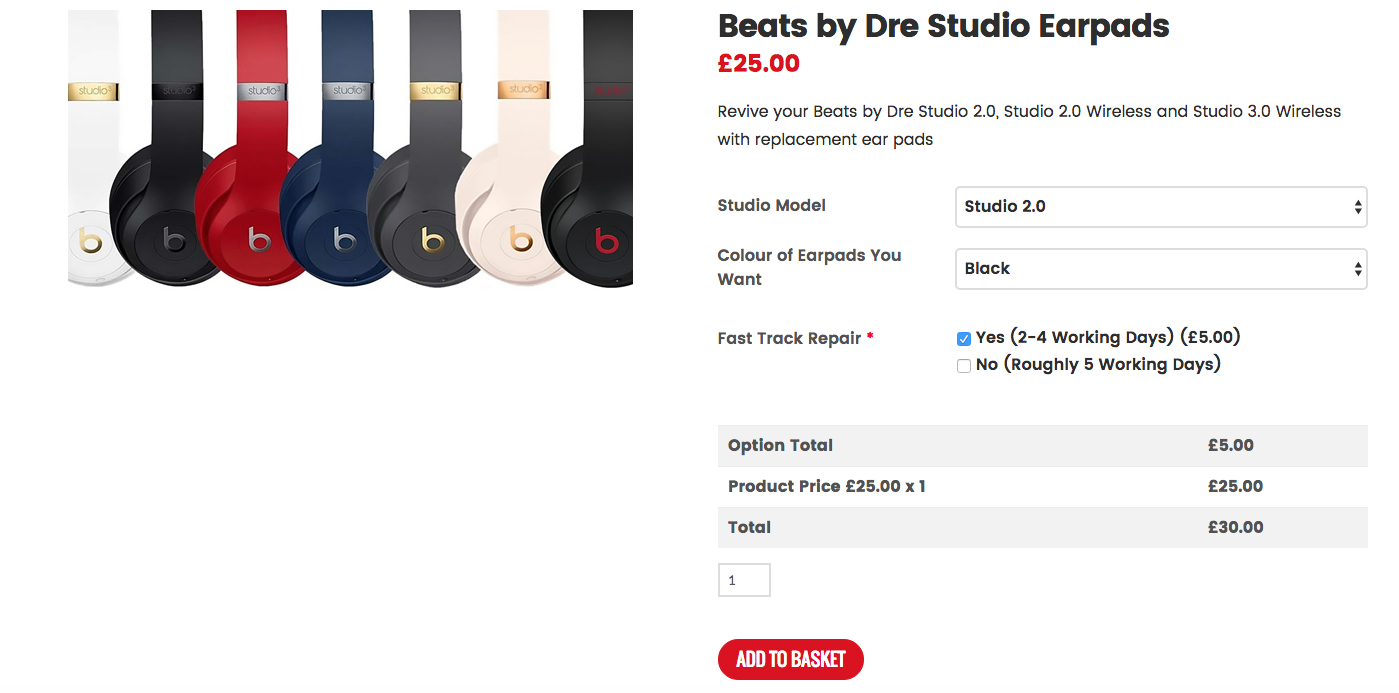
Thanks!

Hello @core365,

Thanks for reaching out. :slight_smile:

Please add following CSS under X > Theme Options > CSS:

.ppom-wrapper .form-check-inline {display: block;float: right;width: 60%;}

.ppom-wrapper .form-check-inline .form-check-label {
    padding-left: 0 !important;
}

.ppom-wrapper .form-row > .col, .ppom-wrapper .form-row > [class*="col-"] {
    width: 100%;
    max-width: 100%;
    flex: auto;
}

1- I have found the proper CSS code selector using the Chrome browser Developer Toolbar: https://www.youtube.com/watch?v=wcFnnxfA70g

2- For the CSS code itself, I suggest that you get started with this tutorial: https://www.youtube.com/watch?v=yfoY53QXEnI

Thanks.

That’s great! Spot on!

Thank you so much!

You are most welcome. :slight_smile:

This topic was automatically closed 10 days after the last reply. New replies are no longer allowed.