Aligning Logo and Menu titles separately on navbar

Hi,

I’ve tried to find the answer to this on the forum but unable to get the main header/navbar to look the way I want. Currently, the menu and logo seem centred together and the container seems to have a limited width as some of the menu titles fall into a second bar below the header when I add more menu titles.
I want the end result to do the same as the navbar on this website Baianat
Is this possible?

  1. I want the logo to be positioned fixed on the left side of navbar and the menu titles aligned to the right (as in the example)
  • I want the navbar to do the same function as in the example when you scroll down the page (disappear when you scroll down and reappear when you scroll up), but doesn’t have to change colour or remove borders. If this is possible with themeco x that would be great but if not please primary let me know how I can achieve point number 1.

Thank you!

Kind regards,
Bhani
Hi There,

Thanks for writing in!

Unfortunately the feature you are looking for doesn’t offered by “X”. How ever we would encourage you to try our other product “Pro” which have Header and footer builder, and you can customize the header as per your requirement without changing code, also you can achieve the header as per the example.
If you want to achieve this in “x” please do it with help of a developer, we are really sorry but this is something out of our theme support scope.

Thanks

Hi!

Thanks for your reply.

Okay that is understandable that you don’t offer such feature. But it’s also not possible to help me position the logo to the left and the menu text to the right? I’m sure this should be possible without requiring pro… my navbar is currently a mess, breaking off into two bars and blocking part of the header on the page. Please let me know if you can help me fix this at all using css codes perhaps. Thanks.

Hi there,

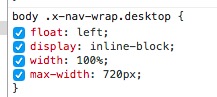
The reason that the navbar does not have enough space is because you added a custom CSS code to make it small:

Please remove that part of the code and the search icon will go inline with the rest of the menu items. Now the problem is that you set the website with to be too narrow, it is 900 pixels which is too tight, go to X > Launch > Options > Layout and Design and make the max width bigger and the nav section will have the correct place to sit.

Thank you.

Thank you Chris!

Glad that we could be of a help :slight_smile:

This topic was automatically closed 10 days after the last reply. New replies are no longer allowed.