Adjust button height/padding

Hi there,
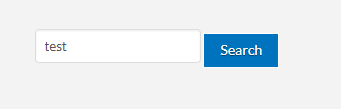
I can’t see to get this button in my sidebar to sit level with the text field.

It’s just a little HTML widget - I’m not sure how to post the code with it actually running within the post, so here’s a picture of it

image

And here’s how it looks in my sidebar :face_with_raised_eyebrow:

image

Hi Kym,

Thank you for writing in, regretfully we cant provide support for customization here. I guess is there is a margin above the button or the input field has a bottom margin, either way, you need to remove those margins to level them.

You can find the proper CSS code selector using the Chrome browser Developer Toolbar
For the CSS code itself, I suggest that you get started with this tutorial

Alternatively, you may opt-in on our One service for further assistance.

Cheers!

But the CSS it’s referencing is part of the Pro theme.

Hi Kym,

Yes, but you have a custom HTML markup.

Another way to remove the margins on the input and button is you can apply a helper-class man.

Hope it helps,
Cheers!

This topic was automatically closed 10 days after the last reply. New replies are no longer allowed.