Something in the theme is causing an auto creation of extra pages by adding an extended url at the end “/www.littletonfinejewelry.com”. Can someone direct me what is happening here? These pages do not exist because this is auto generated now after I add a new page to my website. As you can see from this something automatically is set to add this "/www.littletonfinejewelry.com at the end of all my new pages I am creating which ultimately creates a ficticous page that is being scrolled as a 404 page. This just started happening after I addressed the http / https issue. 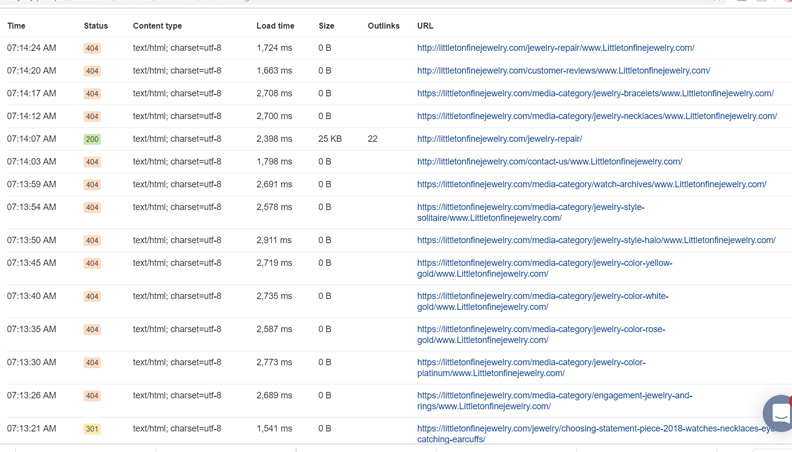
Hello Melissa,
Thanks for the very detailed post information. This issue could be caused by a 3rd party plugin, a broken code or possibly your permalink settings.
Permalink Setting:
- Please go to Settings > Permalinks and check your settings. You may have accidentally added the url in your permalink settings.
Broken Code:
- Also check your child theme’s functions.php code. Maybe you have a custom php code that modifies the url or somehow affects the display of the url.
Plugin Conflict:
- If you have installed several plugins, maybe one of these plugins is modifying the permalinks of your site adding the url.
If nothing is helping, we would love to check your site. You may provide us your WP Login details and your FTP details so that we can investigate the issue further.
Regards.
I checked the permalink and it is set to custom which states our url and then it adds: /%category%/%postname%/
I dont think that refers to what is happening though… Something was happening on the server that was causing one of my pages to create a 409 the server company stated it was from some “block” being not set right. they changed this on their server and then it cleared up nothing was wrong with the site. Three days later this happens. … Could this be in a block? if so where would I find this?
I have not added a plugin since this started happening everything has stayed the same.
I looked at broken code but I did not see any… .
Hey Melissa,
Please check your .htaccess. If you haven’t change any of that, most probably your hosting provider did. The default contents of the .htaccess is this:
# BEGIN WordPress
<IfModule mod_rewrite.c>
RewriteEngine On
RewriteBase /
RewriteRule ^index\.php$ - [L]
RewriteCond %{REQUEST_FILENAME} !-f
RewriteCond %{REQUEST_FILENAME} !-d
RewriteRule . /index.php [L]
</IfModule>

# END WordPress
And check the secure note for the actual contents of your .htaccess.
Thanks.
This topic was automatically closed 10 days after the last reply. New replies are no longer allowed.