I’d like to do something like the photo attached but cannot figure out if the template will allow for it. I am hoping so! Please advise. 
Hi @danmaat,
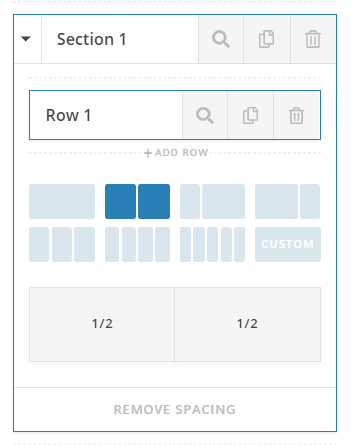
Thank you for reaching out to us. You can achieve this with Classic Block Grid element. To have a similar layout, first add a section, then select a two column layout (see screeshot)
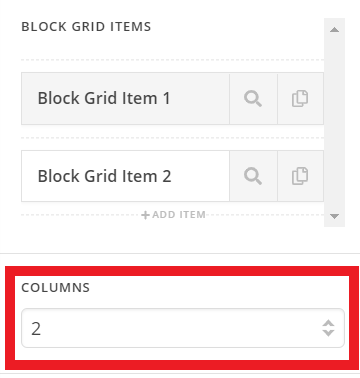
In your right column, add two Classic Block Grid elements. Let them be 2 columns grid (see screenshot)
You should see the following layout:

Hope this helps!
Very helpful! I was able to mimic what you have (see below). Now, is there a way to put background images behind each of the block grid items?

Hi there,
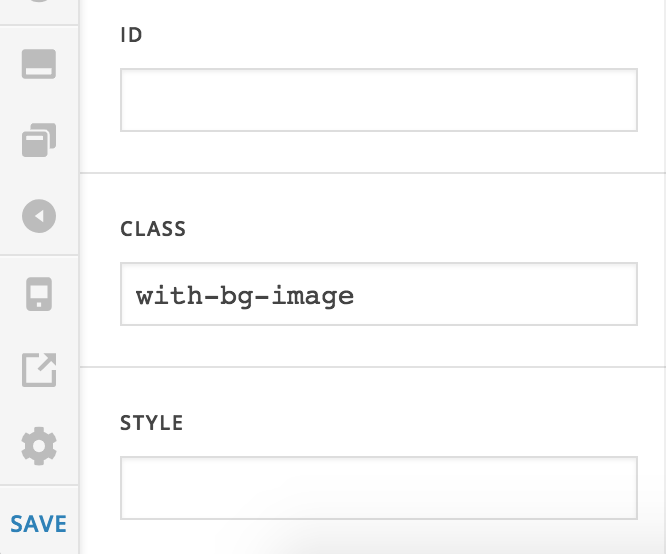
Please add a class to the Classic Block Grid Element then add an inline CSS to each grid item’s style field like this:
background-image: url(URL_OF_THE_IMAGE);
Please change URL_OF_THE_IMAGE to the URL of the image accordingly.
Then add this to X > Theme Options > CSS:

ul.x-block-grid.with-bg-image li {
    background-size: cover;
    background-position: center center;
    padding: 30px;
    width: 50%;
    margin: 0;
}
The code above assumes that the class you have added to the grid element is with-bg-image.
Hope this helps.
This topic was automatically closed 10 days after the last reply. New replies are no longer allowed.