Hi, I’m making a non profit charity website that will allow women with cancer to post their stories. I want to make it easy for people to find their stories, i.e. for Sarah P’s sister to go on the website and find it. Or for Mr Q from Australia to easily find all the posts for Australia. Currently the only way I can think of doing this is adding a menu item All/NZ/Aus/Canada etc…and linking to the archive pages.
Is there a way to do it so there is only one blog page and it’s easy for people to find certain blogs or categories. The posts have categories for countries and then 3 different tags for whether they have cancer, know someone with cancer or just want to help out. It would be great to have links at the top of the page that people can click through.
Additionally is it possibly to have all the blogs on the blog page and flick through different pages i.e. page 1, page 2 etc…? If not how do I make it obvious there is an archive page on the blog page?
Thank you
HI There,
Thanks for writing in!
You can make a blog page which has all the post. Just create a page and in Dashboard-> Settings-> Reading choose your post page as the page you have created for the port.
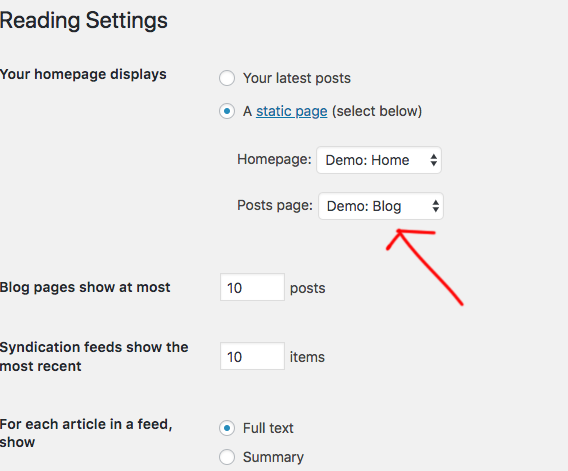
Now that page will have all the post.
Then go to Dashboard -> Appearance -> Menu now you can add this page to your main menu. and also your category links that you want for the different country.
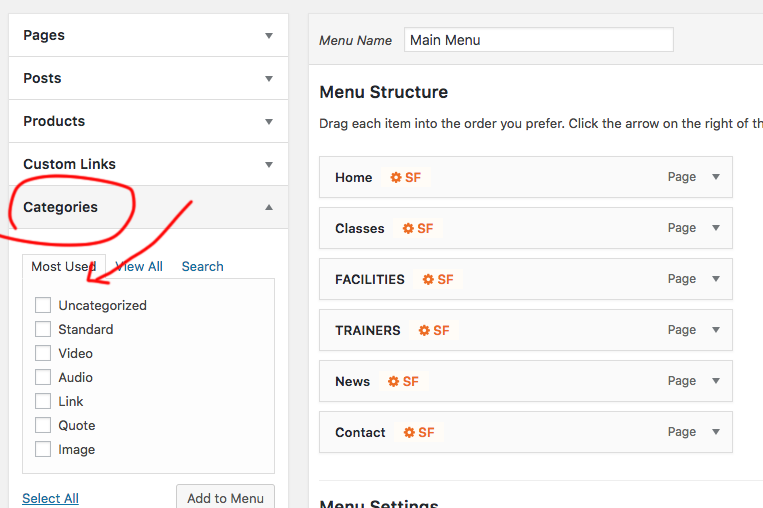
Hope this is something you are looking for.
Note: the site link is in under construction, we can’t see it.
Thanks
Thank you for your answer. In your screen shot it sets a limit for how many posts appear on the page. How do I get all the posts to appear on the blog page.
Additionally is it possible for the categories just to be listed on the blog page as per my initial query - I don’t want them in the main menu?
I’ll put the log in information in a “secure note” which will give you a better idea about what I am talking about.
Many thanks
Hello @curemyovariancancer,
Thanks for updating the thread. 
To display all the blog posts, you can refer following tutorial.
http://www.wpbeginner.com/wp-tutorials/how-to-display-all-your-wordpress-posts-on-one-page/
Regarding categories to be listed on blog page, I see that you are using Ethos stack. In Ethos stack you have the option to display filters that users can use to filter articles. Please see the screenshot.

You can activate the same from X > Theme Options > Ethos > Blog Options > Filterable Index.

Thanks.
Thanks for your help Prasant!
I’ve added the filterable index as you kindly suggested. How do I get it to display all posts as default rather than just the first category on the index?
Additionally it now is in standard view layout rather than masonry despite the fact that masonry has been selected.
Re: displaying all posts on one page - I’d like to keep the plug ins to a minimum for site speed and I’ve already got a lot. From what you have said when I get to a certain number of blog posts it should give an option to go to the next page?
Many thanks.
Jane
Hi Jane,
It seems there’s a bug on our filterable index option. I see you only have 4 posts on your blog page while you have added 8 categories and only two of them does not have any posts assigned. I will submit this to our issue tracker, so that our developers will review it.
I see that you have enabled a caching plugin on your site. We recommend to disable caching plugins while you’re developing your site. If you still see any issue, you need to disable your 3rd party plugins and test.
With regard to pagination, you can set number of posts to display per page by head over to Settings -> Readings section.
Thanks!
Thank you Midarshana for all your help. I will await to here from the developer.
Can you please tell how to ensure “pagination” happens? When I change the maximum number of posts under the reading setting to two, there is not an option to go the next page to see more posts.
Kind regards,
Jane
Hi there,
Please note that Filterable Index is Ethos specific feature, and its functionality is different from the standard blog page. If you wish to use a masonry type layout, then please disable this filterable index in Theme Options > Ethos.
And sorry for the confusion, the filterable index feature has no pagination . It only picks the first set of posts ( based on the post count set in Admin > Settings > Reading).
So if it’s set to 10, it will only pick 10 posts from that group of a category. BUT, if you have posts more than 10 (like 20), a button should appear saying See All Australia Posts (given the category name is Australia). It will then bring you to the category page where you’ll see the standard list with pagination.
The bug that I see is that the See All button isn’t appearing because of this CSS,
.x-btn-filterable {
    display: none;
    margin-top: 35px;
}
The temporary fix is adding this CSS to your global custom CSS.
.x-btn-filterable {
    display: block !important;
}
Thanks!
Ok so just to clarify if I want the filterable option I can’t also have masonry? it must be in standard view?
Thanks
Yes, you can’t have them both unless you’ll do some full template customization which we don’t recommend.
Thanks!
This topic was automatically closed 10 days after the last reply. New replies are no longer allowed.