I uploaded a custom font which X seems to be recognizing and inputing but when I try and target the selection it doesn’t change to the correct font. Any ideas where I’m going wrong with this?
1 Like
I’m getting the same thing. I’ll be very interested to read what will be said here.
Thanks
Hello @philgreen and @mhkatz,
Thanks for posting in!
When uploading a custom font via the Font Manager, you will need to use it at least one in any of the elements on the page so that the font file will be loaded on the page. If you are using a headline element, please use the headline element settings to select a font family in the Text Format option. See the image below:
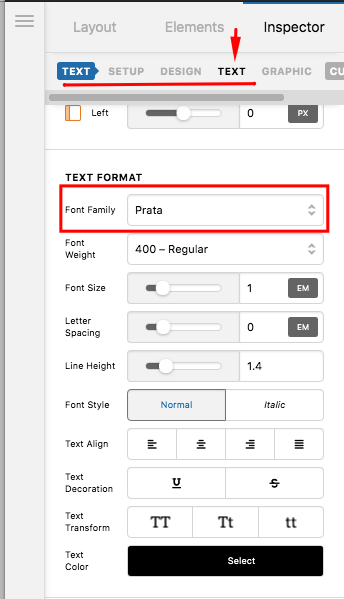
Hope this helps.
I tried that I can get the customer font to appear in the section but it does not display when selected.
EDIT - OK it works when you SAVE and view the page. It doesn’t display in Cornerstone as you go so it works just Cornerstone doesn’t display it correctly which is an easy workaround.
Hey @mhkatz,
Thanks for updating the thread. Yes, it will work in the frontend. Like in this thread, it will also work in the builder if you save and reload the builder.
Please stay tuned for succeeding updates to see if this is improved.
Thanks.
This topic was automatically closed 10 days after the last reply. New replies are no longer allowed.