Hi guys,
I am currently using Mailer Lite as email management. I am having trouble syncing Convert Plus with Mailer Lite. As a result, I would like to use a simple form that I created on Mailer Lite, this is an the form that I want to insert. https://landing.mailerlite.com/webforms/landing/k7x5r3
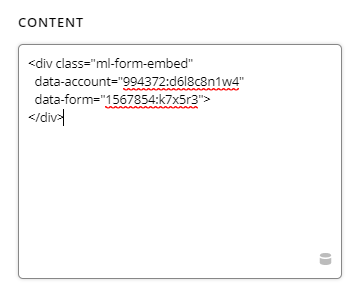
The have provided me with a Java Script code. I want to add it to only on page. This is the code
<div class="ml-form-embed"
  data-account="994372:d6l8c8n1w4"
  data-form="1567854:k7x5r3">
</div>
I am trying to add the element Code Snipet and copying it there but it doesnt work.
Where am I suppose to insert the code?
Thanks a million
Pablo