Hi,
I want to use a lot of styles of the Montserrat (Google Fonts). But the Pro theme only allows me to load 2 styles (400 & 700).
How can I add and use more styles?
Thanks,
Arnau
Hi,
I want to use a lot of styles of the Montserrat (Google Fonts). But the Pro theme only allows me to load 2 styles (400 & 700).
How can I add and use more styles?
Thanks,
Arnau
Hi Arnau,
Go to google and get the styles you need. See this:https://screencast-o-matic.com/watch/cb1UhblQvh
Then on Embed tab > @IMPORT, copy the line of code created based on the font weight you have chosen plus a custom CSS on how to use this font, like below:
@import url('https://fonts.googleapis.com/css?family=Montserrat:100,100i,200,200i,300,300i,400,400i'); .custom-font-300{ font-family: 'Montserrat', sans-serif !important; font-weight:300 !important; }
Setup a child theme. Copy that line of code on your child theme’s style.css file at very top. Like this screenshot:
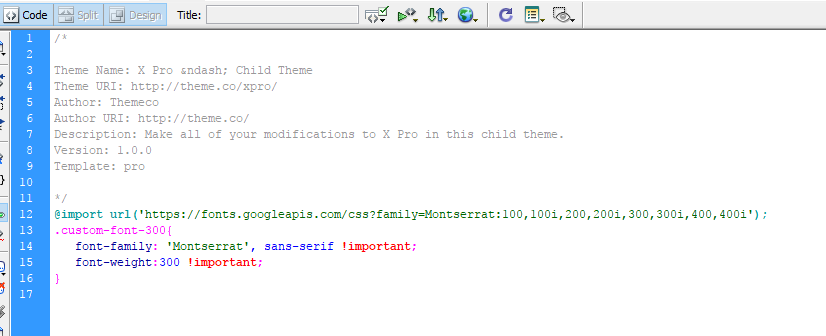
To use it on element, just add custom-font-300 to your element class field.
Hope this helps.
Great! Thanks a lot
You’re more than welcome, glad we could help.
Cheers!
This topic was automatically closed 10 days after the last reply. New replies are no longer allowed.