Hi,
I want to use Pro to create my blog posts. When I use the WP editor, the meta data is showing. But how can I add meta data or social share buttons when I use Pro editor to create posts?
Thanks, Jan
Hi,
I want to use Pro to create my blog posts. When I use the WP editor, the meta data is showing. But how can I add meta data or social share buttons when I use Pro editor to create posts?
Thanks, Jan
Hi Jan,
Thank you for writing in, to add a social share on your posts, you can use either the Social element or the Classic Social Sharing element. The Social element is more customizable but you need to set an element per icon.
If the metadata has nothing to do with the theme and its, not on the Posts Settings, then you need to set that in WP editor. either before or after you finish the posts.
Cheers!
Hi Friech,
Thank you for the quick response. Okay, I see the meta data now! But is it me, or isn’t there a ‘edit with pro’ button available when you create a new post?
And is there a way in Pro to easily add category posts on a page? Or is the only way to do this with a plugin like The Grid?
Thanks again,
Jan
Hello Jan Hoogland,
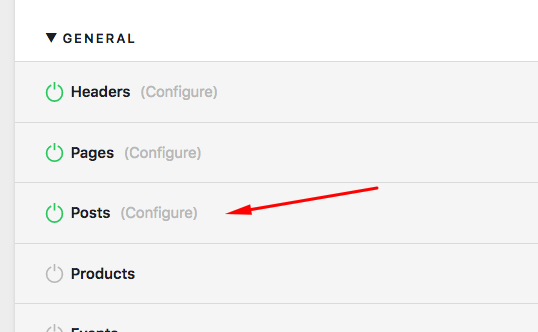
By default, the “Edit in Pro” is only available in pages. You will need to go to Pro > Settings > Permissions to allow Pro editor to edit the the Posts.
You can use the recent posts element or the grid plugin to display post items in your page.
Hope this helps.
Thanks, I can edit the post in the editor. But I don’t see when I go the post in the Wordpress editor, there is no ‘edit with pro’ button.
Thanks, Jan
Hello Jan,
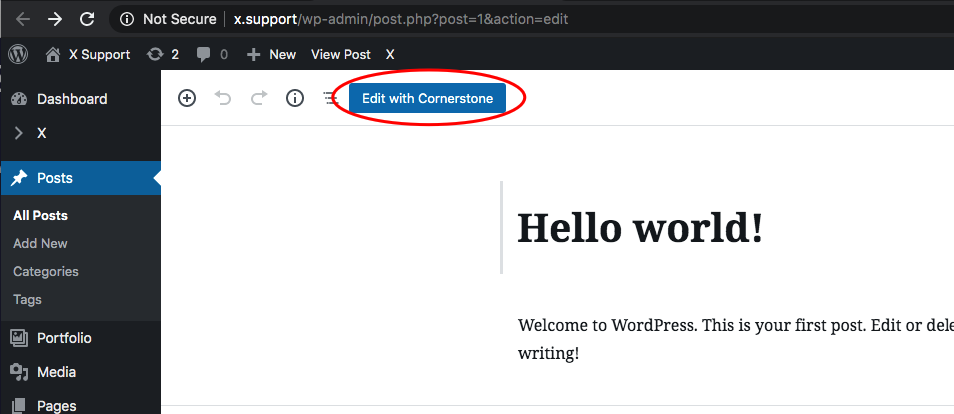
If Posts is already allowed, you should be seeing the “Edit in Pro” button.
If nothing is helping, provide us access to your site so that we can check your settings. Please create a secure note with the following info:
– Link to your site
– WordPress Admin username / password
To know how to create a secure note, please check this out: https://theme.co/apex/forum/t/how-to-get-support/288

Regards.
This topic was automatically closed 10 days after the last reply. New replies are no longer allowed.