Add margin on mobile

I need to add 20px of margin on mobile sitewide, but adding the @media query didn’t help b/c there looks to be another piece of code over-riding it. I was able to get it to work when inspecting the element and adding padding: 0 20px manually (underlined in red in picture below), but I don’t know where to find this. Most forums about the subject are from 2016 or so.

Here is what I added to my custom CSS tab, which didn’t work:

@media (max-width:480px){
.x-main.full {
padding: 0 20px;
}
}
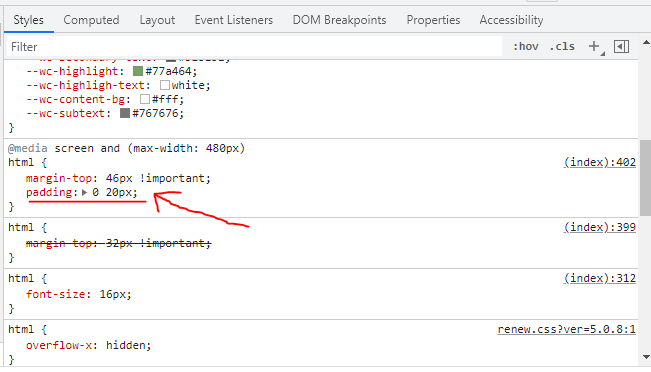
image

Here is the original @media query, which you can see is missing the padding element and also has the width set to 782. So where is this code so I can change it to 480 and add 20px padding?
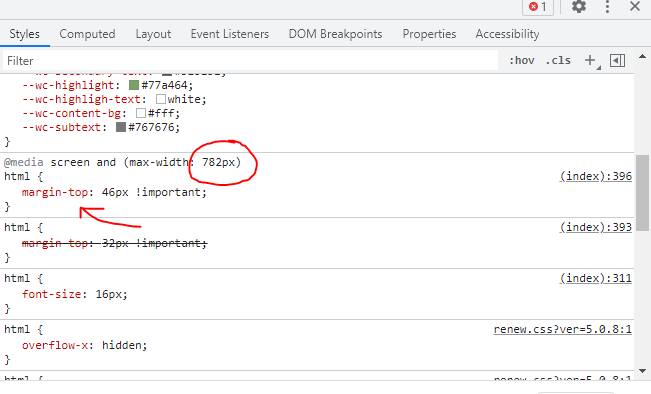
image

Hi @ppe29,

Thanks for reaching out.
I have tried to check your website but the access is restricted. The custom CSS shown in the given screenshot might be added into the Global CSS from Theme Options > CSS, Page CSS from specific page or from Element CSS for specific element. If that is not found, you can check Appearance > Customize > Additional CSS.
Please remember that we don’t offer any investigation or support to the custom CSS code or related issues.

Thanks

I was able to find it. Thanks

Hi @ppe29,

Great and you’re welcome! If you have any other concerns or clarifications regarding our theme features, feel free to open up a new thread.

Thank you.

This topic was automatically closed 10 days after the last reply. New replies are no longer allowed.