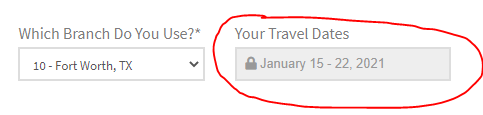
Add font awesome icon to CF7 placeholder text

Howdy,
I am trying to add the free Font Awesome lock icon to the read-only placeholder text of a conditional logic text field in CF7. I’m so close, I just can’t get the darn icons to appear!

I would like a lock icon to appear before the J in January as seen in the pic below.

Webpage where this exists is in a private note below, but you have to select an option for “Branch” in order for the field to appear. (Conditional logic)

Here is the code:

image

Hello @ppe29,

Thanks for writing in! Regretfully, this particular customization request is outside the scope of our support as this is not related to an issue with the theme and instead has to do with your customization of it. As such, you will need to investigate this particular issue on your own or seek help from a developer should you not feel comfortable making these changes yourself.

Note: We are unable to provide support for customizations under our Support Policy. If you are unfamiliar with code and resolving potential conflicts, you may select our One or Care service for further assistance.

Thank you for your understanding.

It doesn’t have to be Font Awesome. Instead of using Font Awesome, is there a code for a lock icon that comes as part of my X theme Pro license like “x_icon_lock” or something?

Hello @ppe29,

Be advised that the placeholder only accepts texts. You cannot add any icons to it. It may be possible with custom CSS which is beyond the scope of our support. Perhaps these links can help you understand:

Best Regards.

“Be advised that the placeholder only accepts texts.”

OK. Thanks anyways

You’re welcome.

I figured it out!! This link was very helpful: https://codepen.io/huckbit/post/fontawesomeplaceholder

First you have to install the Font Awesome plugin.

Then I added this to my code:

And this was the final result:
image

For anyone following along, note these things:

  1. The only reason my css code starts with [group Group2] and ends with [/group] is b/c this field is part of a conditional logic that if the Fort Worth branch is chosen as the Branch, it shows the Group 2 field. It would be unnecessary in your code.

  2. The reason my code has readonly in it is b/c when this conditional logic field appears, I don’t want the user to be able to change it as these are set travel dates. Your code would not need it if you didn’t need this functionality.

  3. The font code for the lock icon is f023 and must be displayed as seen above from the & to the ; or it won’t work. To see the list of all Font Awesome icons and their 4-digit codes, go here: https://fontawesome.com/icons?d=gallery&p=2

1 Like

Hi @ppe29,

Glad to know that you have found the solution. And thanks for sharing it with others.

Thanks

This topic was automatically closed 10 days after the last reply. New replies are no longer allowed.