Add class to X Button element

Hi Team X,

We’re installed an Buddypress plugin extension that features a class that creates a link lightbox for login and registration forms. This is working perfectly when added as a cornerstone text element but when added as a button we can not seem to have them open the lightbox in the same way.

original link code and class are

<a href="#" class="popup-login">Login</a>

but we’ve haven’t had any luck adding ‘popup-login’ to the X Button or Classic Button class fields (or ID, Class or Element CSS - for either)

Are we adding this button link class in the correct place for these elements?
Or is there another way to add a class to an X Button link?

Many thanks.
Hello @DeeDesign,

Thanks for writing in!

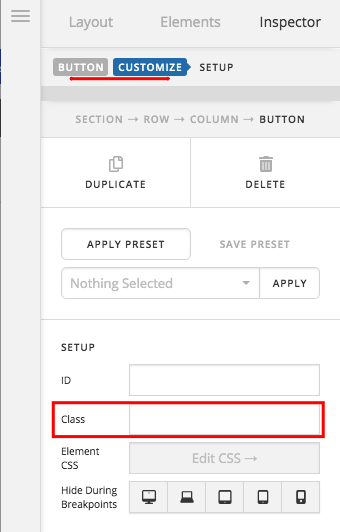
Are using the button element in Cornerstone? If that is the case, you can add the custom class popup-login in the class field which you can find in the “Customize” tab in the button element settings.

Hope this helps.

1 Like

Thank you RueNel,

We did try that but have not had any success.
Please can you review and advise.

Hey @DeeDesign,

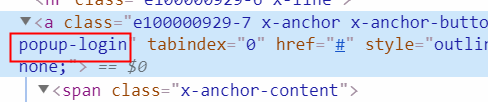
When you assign a class to a button element whether it’s V2 or Classic, the class is directly applied to the anchor tag so, in terms of setup, our Button element has no problem.

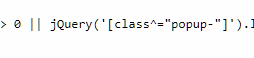
I saw this script which is related to the popup class: /wp-content/plugins/userpro/scripts/up-custom-script.js. It looks like the third-party plugin only targets classes that starts from popup. You should contact the plugin developer to change that or allow other classes to be in the link like the case for our Button elements. If they won’t allow other classes for the link, you need to manually use HTML.

You also placed PHP functions in the Global JS. Though it does not seem to affect the third-party popup, it is a potential cause of conflict later.

Hope that helps.

Thank you Christian,

I have not heard back from the deluxethemes crew yet - but wondered can I add a class to the regular html register link (that’s working) that would change it into an X Button?

Got it - class=“popup-register x-btn x-btn-square x-btn-large”

and I removed the misplaced php as well - thank you for the heads up :blush:

Glad you sorted things out,

Cheers,

This topic was automatically closed 10 days after the last reply. New replies are no longer allowed.