Hi there,
Have read the other threads on this topic but still can’t seem to get it working.
I would like to add a logo to the mobile navigation on my site:
Would you be able to help me achieve this please?
Thank you.
Hi there,
Have read the other threads on this topic but still can’t seem to get it working.
I would like to add a logo to the mobile navigation on my site:
Would you be able to help me achieve this please?
Thank you.
Hi @ifkda,
Thanks for reaching out.
It seems that you are using the Content Area Modal to show the Navigation in the mobile devices. Regretfully, there is no such option to add the logo inside the Content Area Modal
So I would suggest you create a Global Block with the Logo and add that Global Block shortcode to the content area modal.
In global blocks, you can create the content structure as you can in the content builder, but the global block can be saved and called a shortcode wherever it is needed.
To know how to create the global blocks and used it as a shortcode, please go through this article: https://theme.co/docs/global-blocks and the shortcode section: https://theme.co/docs/global-blocks#how-to-use-a-global-block
Hope it helps.
Thanks
Hi Tristup,
I don’t really understand what you mean.
I want to put the logo on this part above the buttons for navigation.
Please help me. I desire your support.
Hi @ifkda,
Here’s what my colleauge Tristup trying to explain it to you. He suggest that you create a Global Block. i.e. I created a Global Block Test 2
Once you are done creating your Global Blocks, then press edit so that it will redirect you to the builder page. Then in the builder page, is where you create your logo and menu layered.
Then in your header builder, please add the Global Blocks shortcode inside your Content Area Modal and you can get the Global shortcode here.
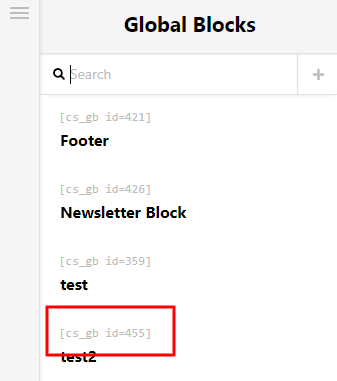
Hope that helps and let us know how it goes.
Thank you.
This topic was automatically closed 10 days after the last reply. New replies are no longer allowed.


