Active link in the navigation not applying state of the particles, if link color is preserved

Hi!

I have a navigation that has base and the hover (active) colors. I want to keep the base link color on the active page with a secondary particle behind it.

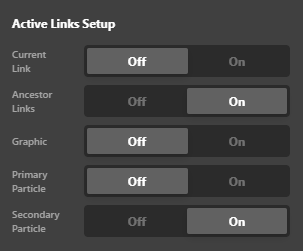
I’d expect this setting to be doing that:
image

So current link turned off, and the Secondary particle turned on. However that is not happening. The secondary particle is not seen on the active link with this setup.

Is there a way to avoid showing the hover color on the active nav item, while keeping a particle active?

Thanks!

Hello @Misho,

Thanks for writing in! Regretfully there isn’t an option to accomplish what you have in mind. It can only be done with a CSS snippet. You need to use the Google Chrome Developer Toolbar to check the live HTML code and find which CSS selector you need to use. And in the navigation element settings, find the “Customize” tab and insert this inline element CSS:

$el .current-menu-item .has-particle .x-particle.is-secondary {
    transform: scale3d(1, 1, 1);
    opacity: 1;
}

Kindly let us know how it goes.

This topic was automatically closed 10 days after the last reply. New replies are no longer allowed.