Accordions and Tabs don't have tabindex?

Our websites have to be accessible, and discovered that your accordions and tabs are not tab-able via a keyboard. Is there a way you can add a simple tabindex=“0” to the anchor tags on an upcoming update? Thanks.

https://demo.theme.co/ethos-1/shortcodes/accordion/
https://demo.theme.co/ethos-1/shortcodes/tabbed-content/

Hi @tkulow,

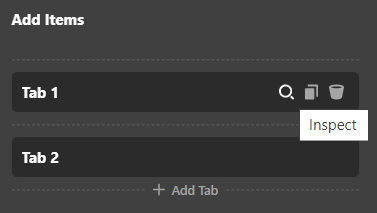
Thank you for reaching out to us. You now have the flexibility to add custom attributes to any elements. To add tabindex attribute on individual tabs, first inspect each Tab item in Content Builder/Cornerstone:

image

Then go to the Customize tab on the inspected Tab item (In this case, it’s the Tab 1):

image

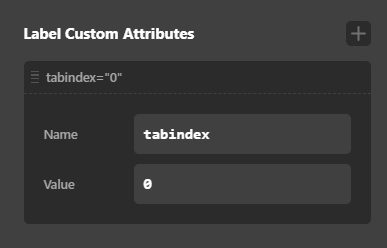
Now add a new Custom Attribute for tab Label with the following settings:

image

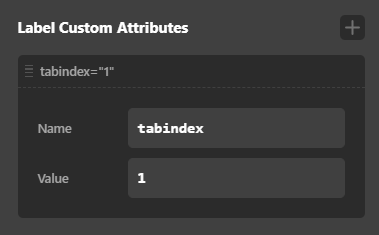
Similarly repeat the same for other tabs, just increase the Value for each tab e.g for Tab 2 your settings should be:

image

Hope this helps!

Thank you. This is good to know when we are adding these as elements in Cornerstone; however, I am looking for a solution with the shortcodes as we are wanting to use them in a custom PHP setting. Do you have a way to add them to the shortcode? I tried just adding tabindex=“0” to the shortcode as a param, but that wasn’t recognized.

Hey @tkulow,

Regretfully this is not available in classic elements or shortcodes, you should use the v2 elements instead. One way you can utilize the v2 elements as shortcode and use them in custom PHP settings is with the Global Blocks.

You can create a Global Block with either Tab element or Accordion element and then use the shortcode of your Global Block anywhere.

Hope this helps!

This topic was automatically closed 10 days after the last reply. New replies are no longer allowed.