Hey @perfettc,
Ethos is a dark theme that is why there is no option to change the color of certain Classic Element including the Classic Accordion and its shortcode version.
With that said, it’s not recommend to invert the Accordion Header to white or invert Ethos to a light template as you have to override a lot of areas. I’d recommend building the page using Cornerstone instead and use the V2 Accordion if you need a different accordion colors.
If you wish to continue, I’ll provide the selectors along with the sample values but please bear in mind that theme modification is outside the scope of our support. The following code should serve only as a guide. Fixing issues resulting from the use of it or further enhancing should be done by you or a developer.
Here’s the code:
/* Accordion Collapsed */
.site .x-accordion-heading .x-accordion-toggle.collapsed {
  background: orange;
}
.site .x-accordion-heading .x-accordion-toggle.collapsed:before {
  color: blue;
}

/* Accordion Active */
.site .x-accordion-heading .x-accordion-toggle {
    background-color: skyblue;
    color: rgb(94, 94, 94);
}

.site .x-accordion-heading .x-accordion-toggle:before {
    color: gray;
}
.site .x-accordion-heading .x-accordion-toggle:hover,
.site .x-accordion-heading .x-accordion-toggle:hover:before {
    color: rgb(94, 94, 94);
}
Provided there’s no syntax error in your other CSS and you’ve copied the code completely, you should get the following result:
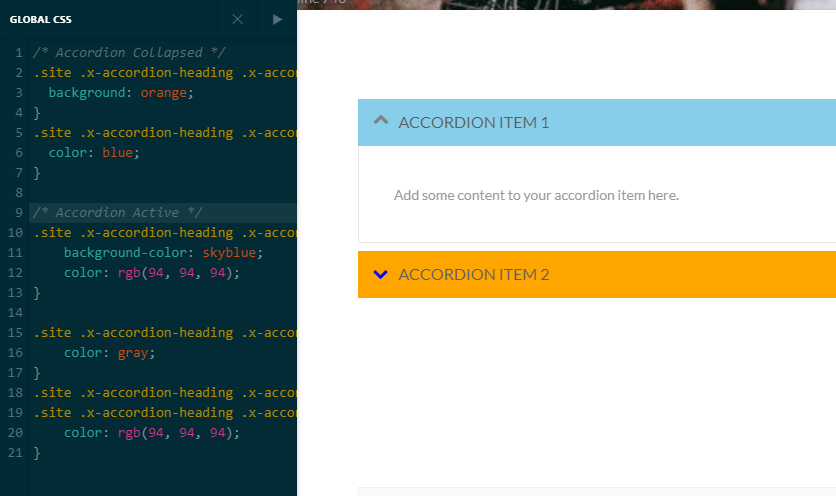
I believe what colors in the code affects what area. If not, please hire a developer to update the code.
Hope that helps and thank you for understanding.

