Accidentally converted cornerstone page to shortcodes -- can it be reversed?

Hi there. About a year ago, I converted a large cornerstone landing page to shortcodes by accidentally using revision history. I did research afterward and saw that wasn’t supported. Oops!

I have left the page there in short code form because it still renders. Now I need to update it. is there any possibility of “un-doing” it. Is there any way to get it back into cornerstone format? Even at the database level, perhaps? I’d be happy to dig in and re-insert something into the database if that helps, since I have that technical knowledge.

Please let me know. Thank you! :slight_smile:

Hi @blanchardjeremy,

Thanks for reaching out.

Unfortunately, the only solution would be restoring the database itself since the data are corrupted. It’s only displaying due to the code remnants of the builder. Which also serve as a fall back so it would still work on the actual page even the data are corrupted.

Fixing the data could cost much time on your end and mostly impossible since it’s Wordpress serialized data.

Thanks!

Thank you for your support. I’ll re-build it inside cornerstone from the ground up.

Hi @blanchardjeremy,

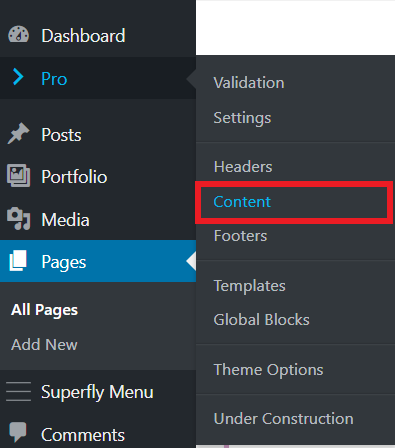
One way to recover the page is to try going through “Content” from the Pro / X menu

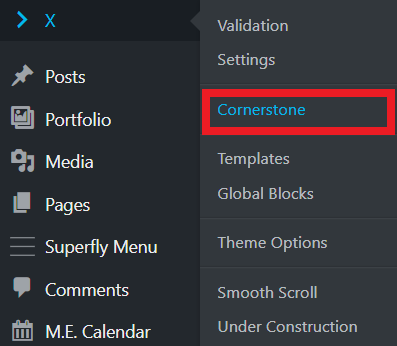
In X you can go to X > Cornerstone (see screenshot)

Then find your page and click on edit button to edit the page in Cornerstone (see screenshot)

That probably will bring back your page for editing in Cornerstone.

Hope this helps!

1 Like

This topic was automatically closed 10 days after the last reply. New replies are no longer allowed.