Hi
I’m facing two issues:
1 - The page (learn.mobileodt.com/welcome) isn’t working on the mobile site version, and shows weird text instead of the page itself.
2- In addition to that the header isn’t showing correctly, we didn’t create that header.
Hi There,
I could see that the navigation collapsed element isn’t working.
To fix this issue, please turn off the Content Scrolling option:
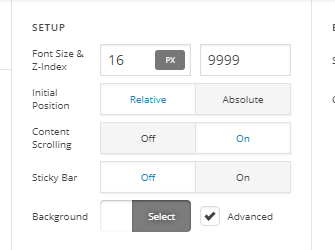
Please provide us with some screenshots.
Thank you.
Hi
Thank you, but may I ask where can I find the content scrolling?
and that’s the snapshot for the mobile site?

Hello There,
Content scrolling can be found in the bar settings.

Your page in mobile is displaying fine on my end. You may seeing it differently because you have installed Cache Enabler plugin. Please clear all your plugin caches and your browser cache as well. You can use private browsing mode in testing your site in mobile again.
Please let us know how it goes.
Hi, Thank you
The pages on mobile version site are still the same / when I open it with my cell phone
learn.mobileodt.com/welcome
learn.mobileodt.com/eva-for-cervical-cancer-screening
Hello There,
I have checked the page and I can confirm that it is showing what you have in the screenshot. That is because you are using Jetpack plugin and mobile theme is enabled. Please disable this module so that the page will display as expected in mobile. You can check more about this module from this page: https://jetpack.com/support/mobile-theme/
Hope this helps.
This topic was automatically closed 10 days after the last reply. New replies are no longer allowed.