500 Error When Trying To Access Dashboard

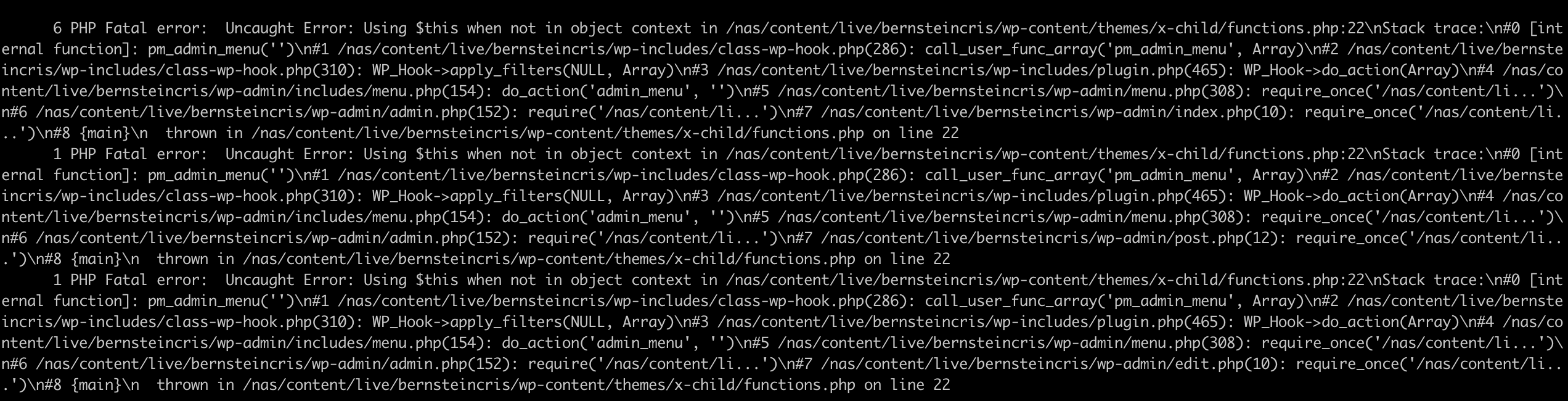
I’m having a 500 Error when trying to access the wp-admin dashboard. This is a screenshot of the error report from my host: http://wpengine-shots.s3.amazonaws.com/1._jcantu_pod-101108_nascontentlivebernsteincris_ssh_2019-04-15_14-27-57.png

We are on php 7.2 and recently installed the latest version of X Theme but the problem continues.

Hi Erik,

Thanks for writing in! Upon checking, it seems that your errors are related to your child theme customizations. Could you please try disabling your child theme by reactivating your parent X theme by head over to Appearance -> Themes section.

If the issue is resolved, then you need to check your child theme customizations to isolate the issue further.

If you’re still having issues, try disabling your 3rd party plugins (except Cornerstone plugin) and see if you’re encountering a plugin conflict. If the issue resolved, then you can activate your plugins one by one to see which plugin causing this issue.

Please make sure to clear all caches when testing your issue (https://www.wpbeginner.com/beginners-guide/how-to-clear-your-cache-in-wordpress/).

Let us know how it goes.
Thanks!
I’m not able to access the Appearance -> Themes section because I can’t access the site dashboard or admin section. Is there another way?

Hello Erik,

Thanks for updating the thread.

You need to login using FTP softwares like Filezilla and under /wp-content/themes/ and rename x-child folder to something else (to make sure website is up and running). After that you need to manually look into the changes made in child theme and remove the code that’s causing issue.

Here’s resource that you can refer to get started with Filezilla.

Thanks.

This topic was automatically closed 10 days after the last reply. New replies are no longer allowed.