404's from building on demo's

I have installed several x-themes before choosing x-theme Agency. I built my website www.agile4all.nl using the theme Agency. I used Agency as start and changed everything i wanted. It’s my first website and it looks great, so I am very pleased with the theme. However, the most 404’s comes from built-in demo url’s, which are not in use. I took a screenshot of some of them. See image:
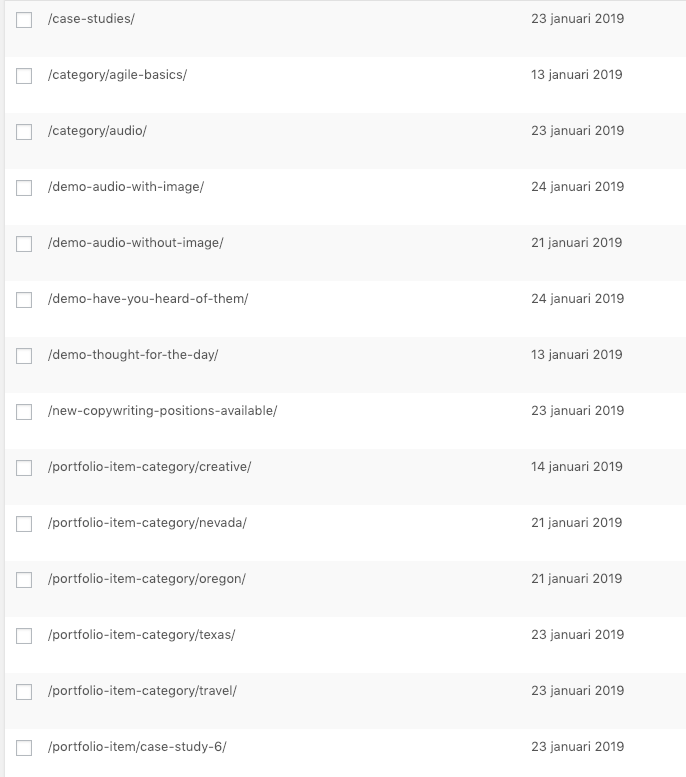
Google find these and others like unused tags somewhere, I can’t. So, where can i find these and can I delete them? I know i can use a 404 page or I can redirect them one by one (using Yoast), but i really like to remove them for good. Is this possible?
Thnx in advance!

Hi Peter,

Thanks for reaching out.

They are more likely non-existing pages or post and google is only scanning it based on the old data when its indexed your site. The solution would be creating those missing page, post, or category but there is no reason to create them since it’s not part of your site anymore. Please check this too https://support.google.com/webmasters/answer/35120?hl=en

It appears that you have to mark them as fixed.

Mark URL errors as fixed

Once you’ve addressed the issue causing an error for a specific item, you can hide it from the list. You can do this singly or in bulk. Select the checkbox next to the URL, and click Mark as fixed. The URL will be removed from the list. However, this marking is just a convenience method for you; if Google’s crawler encounters the error on the next crawl, the URL will reappear in the list the next time your URL is crawled.

It’s just that it doesn’t really need fixing since those URLs are not really or no longer part of your site.

Thanks!

Thnx for the quick reply! Will do as suggested. Greetz.

You’re most welcome!

This topic was automatically closed 10 days after the last reply. New replies are no longer allowed.