1/2 1/2 Row with 3 columns?

Hi team,

I’m trying to get my social icons to sit closer underneath the contact details, but I can’t figure out how to move it up. There is no margin options, so I can’t set a negative margin. How do I move the icons up so they are in a row, underneath the contact info?

Thanks

Ashley

Hi Ashley,

Thank you for writing in, on that first 1/2 Column, on the area where you want the social icons. Add a Row element this element works the same as the Row of the Section.

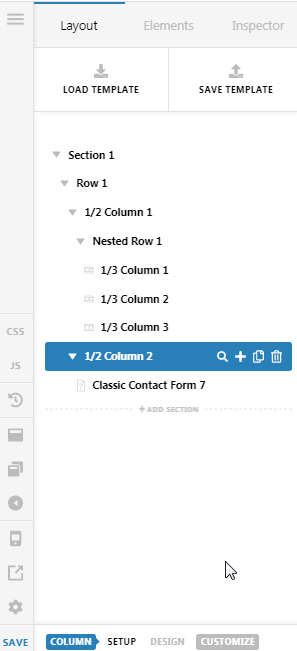
So what will happen is inside your 1/2 column, you will have a nested Row that you will set a 1/3 + 1/3 + 1/3 columns. Then move your social icons each on those columns.

Your section structure would now look like this

And if you want the social icons to stay inline until the mobile view, please set the Nested Row’s all Layout options to 1/3+1/3+1/3 layout.

Hope it helps,
Cheers!

You guys are on fire! I’ve learned two new features I didn’t know were released! I love that you can put a row inside a column now!! Thank you!!

Don’t mention it Ashley!
We’re glad @Friech were able to help you out.

This topic was automatically closed 10 days after the last reply. New replies are no longer allowed.