Tagged: x
-
AuthorPosts
-
October 16, 2016 at 5:39 pm #1218570
 PapertownDesignParticipant
Hi guys, I’m having an odd issue that is hopefully an easy fix.
Basically, I’ve got a slider above the masthead, and the navbar fixes to the top when you scroll down (inspired by the X Theme page on Themeforest). The issue here is that the navbar does not fix to the top, but instead offsets itself and leaves a transparent space. The problem came about when I offset the slider above the masthead (within rev slider settings) to fix the logo to the bottom of the screen. Removing this fixes it, but leaves me with the issue of having the navbar not staying fixed to the bottom on different resolutions / browsers.
(screenshots attached)
Here is my global CSS code at time of writing:
/* Footer colour */
.x-colophon.bottom {
  background-color:#212121;
}

/* Navbar colour */
.x-navbar {
background-color: #212121;
}

/* Menu bar stack */
.x-logobar {
    background-color: #212121 !important;
    border-bottom: none;
    display: none;
}

/* Remove logo from navbar */
.x-logobar-inner {
display: none;
}

.x-brand.text {
    display: none;
}

.x-brand.img {
    display: none;
}

/* Sidebar colour */
.x-sidebar {
	background-color:#212121 !important;
}
I’d just like to get rid of that transparent space above the navbar. Thanks for your help in advance.
All the best,
SamOctober 16, 2016 at 9:49 pm #1218829 NicoModerator
Hi There,
Thanks for writing in! To assist you with this issue, we’ll first need you to provide us with your URL. This is to ensure that we can provide you with a tailored answer to your situation. Once you have provided us with your URL, we will be happy to assist you with everything.
Thanks.
October 17, 2016 at 2:58 am #1219047PapertownDesignParticipantThis reply has been marked as private.October 17, 2016 at 3:19 am #1219070ChristopherModeratorHi there,
The menu is fixed at the bottom of screen and there is no space on top of navbar, please clear cache and check again.
Thanks.
October 17, 2016 at 4:40 am #1219125PapertownDesignParticipantHi Christopher, thanks for getting back to me.
I don’t know what I did to fix it, but it seems to be working now. If I figure out what happened and how I fixed it,I’ll update this post in case others need to reference it.Thanks for looking into it for me anyway.
All the best,
Sam—
Please disregard the above. I purged the cache as you asked and the problem seems to be back now. Would you mind checking it for me please?
Thank you for your help.
SamOctober 17, 2016 at 6:04 am #1219203ChristopherModeratorHi there,
Please check this :
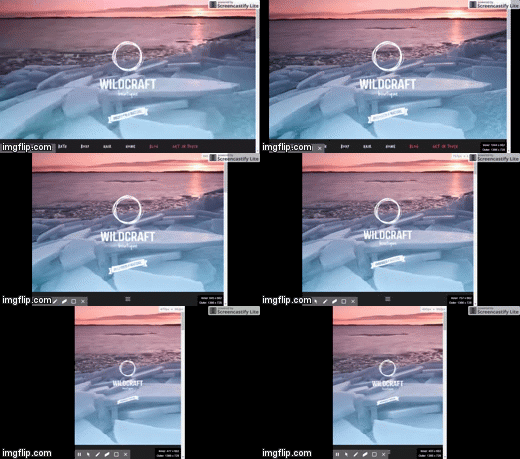
It’s still working fine on my end. Please let us know how we can replicate the issue?
Thanks.
October 17, 2016 at 6:32 am #1219228PapertownDesignParticipantHi Christopher,
Sorry, I don’t think I explained myself too well. The issue occurs when you scroll down, when that navbar moves up and becomes fixed to the top (see Screenshot02 in my original post).
The navbar seems to offset itself from the top, leaving transparent space behind it.
All the best,
SamOctober 17, 2016 at 7:50 am #1219297JoaoModeratorHi Sam.
I tested your website on Chome and Firefox PC and I could not replicate the issue.
Would you mind letting us know what browser and device you are using while experiencing the issue?
Thanks
Joao
October 17, 2016 at 8:13 am #1219313PapertownDesignParticipantHi Joao, thanks for getting back to me. I’m using the Firefox browser (up-to-date) on PC.
Are you able to see the issue visiting the site without logging in via WP? The url is http://www.wildcraft-boutique.com
Thank you,
SamOctober 17, 2016 at 8:44 am #1219335JoaoModeratorHi Sam,
I Guess I just figured out what that is, that is the space of your WordPress Admin Bar, so if we are logged off we cannot see it.
Try checking your website without being logged in. Your visitors won´t see any gap.
Hope that helps
Joao
October 17, 2016 at 10:18 am #1219456PapertownDesignParticipantAh I’m such a penis. Thank you so much guys. It’s been bugging me and I had no idea what was happening. Turns out that it was a third-party plugin that caused this conflict.
As always, you guys have been awesome. Thank you for checking this out for me.
All the best,
SamOctober 17, 2016 at 10:32 am #1219473RahulModeratorGlad it’s working now and thanks for the kind words.
Let us know if you need any further assistance.
Thanks!
-
AuthorPosts
- <script> jQuery(function($){ $("#no-reply-1218570 .bbp-template-notice, .bbp-no-topic .bbp-template-notice").removeClass('bbp-template-notice'); }); </script>
