Tagged: x
-
AuthorPosts
-
September 12, 2016 at 8:29 pm #1172335
 JeypolitanParticipant
Hey there! 🙂
I am using The Grid‘s Panama skin (customized through Skin Editor).
Everything is going well and it customized is exactly how I want it.The issue is that there is a Overlay that will not disappear, as seen in Screenshot 1. It is only supposed to be visible when hovering the post, as seen in Screenshot 2. The middle overlay (with post title, excerpt and categories) only appear when hovering the image. However, the social icons overlay (on the top of the post) does not disappear when not hovering the image.
Please advise on how to make the top overlay disappear and only be visible when hovering.
All best,
JenniferSeptember 12, 2016 at 8:30 pm #1172339JeypolitanParticipantThis reply has been marked as private.September 13, 2016 at 2:04 am #1172621 ChristopherModerator
Hi there,
The grid is displaying fine, please see :
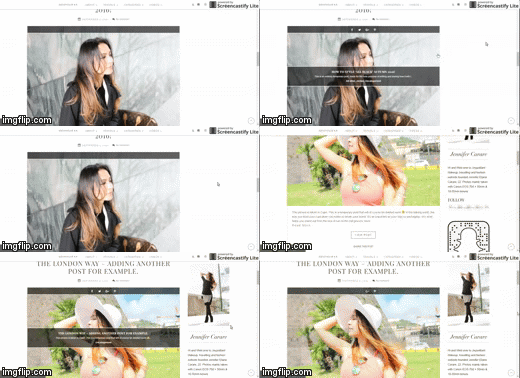
Thanks.
September 13, 2016 at 2:37 pm #1173677JeypolitanParticipantHi there,
Thanks for the video/gif display 🙂
The grid is displaying fine when hovering, yes.
But as you can see, the middle part when hovering (post title + excerpt) is invisible before hovering the post. It only appears when hovering the post.The top part (grey thick line at the pure top of the image) is always there – before and after hovering. This part is only supposed to appear when hovering the image, but instead, it is always visible. Please advise.
All best,
JenniferSeptember 13, 2016 at 11:38 pm #1174300LelyModeratorHi Jennifer,
Please try adding this custom CSS:
.tg-jeypolitan-main-page .tg-item-media-holder:hover .tg-item-overlay {
    opacity: 1 !important;
}
.tg-jeypolitan-main-page .tg-item-media-holder .tg-item-overlay {
    opacity: 0 !important;
}
See this:http://screencast-o-matic.com/watch/cDQ2fAjl9k
Hope this helps.
September 14, 2016 at 7:19 am #1174668JeypolitanParticipantHey!
Wow – thank you! That worked perfectly!
Just one issue. When clicking on those exact icons (Facebook/Twitter/Google +/Pinterest) on top of the post, nothing happens anymore? Before, when clicking on those icons, they would share the post. E.g. clicking on the Facebook icon, would share the post to Facebook.
Now after using the code above, you only access the main post when clicking on the social icons.
Please advise.
All best
JenniferSeptember 14, 2016 at 10:13 am #1174927ChristianModeratorPlease add the code below in your Appearance > Customize > Custom > Global CSS
.tg-social-share {
    z-index: 999999
}
Thanks.
September 14, 2016 at 11:37 am #1175057JeypolitanParticipantThat worked PERFECTLY – thank you so much as always! 🙂
Have a great day!September 14, 2016 at 12:14 pm #1175117Prasant RaiModeratorYou are most welcome. 🙂
-
AuthorPosts
- <script> jQuery(function($){ $("#no-reply-1172335 .bbp-template-notice, .bbp-no-topic .bbp-template-notice").removeClass('bbp-template-notice'); }); </script>
