Tagged: x
-
AuthorPosts
-
May 18, 2016 at 8:55 am #997389
 AnishParticipant
Hi,
I recently changed my domain from configerableframework.com to twigacenter.com. However, when I go to twigacenter.com, it either takes me to http://twigacenter.com/defaultsite, or will take me to http://twigacenter.com and the images will not load (for the home page or any of the other pages).
Also, when I go into cornerstone via wp-admin panel -> pages, the images do show up.
I checked the backend, and the site url change was changed, so there’s no issues there.
TIA,
AnishMay 18, 2016 at 9:24 am #997449 JoaoModerator
Hi Anish,
How did you do the change? What was your process?
Cornerstone stores the page data separate from the final content by using post meta. If you are doing a search and replace, you will need to make sure that your script will work on post meta, and can handle serialized data.
This plugin for example should be able to handle that: https://wordpress.org/plugins/wp-migrate-db/
Just go through the plugin and watch the video to use it.
Thanks
May 18, 2016 at 9:49 am #997490AnishParticipantHi Joao,
All I did was change the domain via settings in the WP Admin panel and then I changed the file path via my hosting service.
Would I still have to use the db migration plugin?
EDIT: Also, is there a way I can see the media file name in cornerstone (or another way)?
May 18, 2016 at 11:11 am #997607RupokMemberHi there,
I think your migration didn’t go well. We have a dedicated article to help our users migrating their site that you could follow – https://community.theme.co/kb/cornerstone-migration/
Cheers!
May 24, 2016 at 4:57 pm #1008015AnishParticipantI’m a bit lost in the migration process – I’m trying to change the domain of my wordpress site (twigacenter.com)
The website that is currently in production is Twigacenter.com (everything is working on that site), and I would like to move it over to the domain governance360.com.
I followed the instructions in the WP Migration DB plugin, however, when I added the tables to the governance360 db, no changes were made in the UI. I went into WP_config and changed the table prefix to the new uploaded tables. However, I get the error “The theme directory “x” does not exist”
Would I also have to reinstall Xtheme?
May 24, 2016 at 10:58 pm #1008437FriechModeratorHi There,
I’m afraid you need to redo the migration process and follow thoroughly the guide provided here: https://community.theme.co/kb/cornerstone-migration/
If you do have a backup of your database (before you do the migration to twigacenter.com) that would be better as I’m afraid too that your current database already lose the meta data that Cornerstone needs.
Don’t migrate to
governance360.comyet, this could mess up your database. You may already have change the URL totwigacenter.combut still your database most probable have data that still pointing toconfigerableframework.com(e.g. Images and links).Follow the migration provided here: https://community.theme.co/kb/cornerstone-migration/
Make sure you find
configerableframework.comand replace withtwigacenter.com
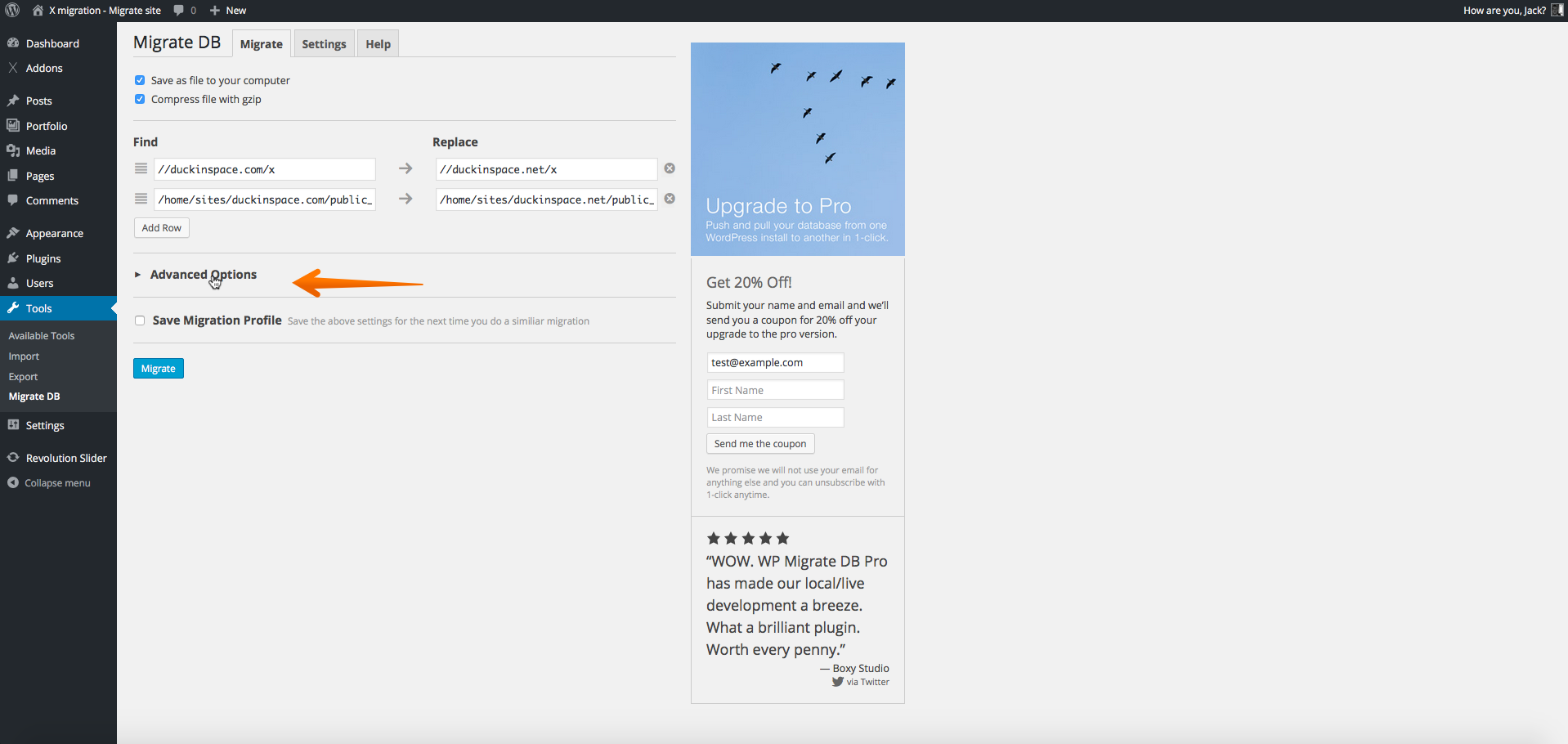
Let us know how it goes.
Thanks.
May 25, 2016 at 4:02 pm #1009802AnishParticipantHi Friech,
Looks like the migration worked – Governance360.com is up and running!
Thank you!
May 25, 2016 at 4:10 pm #1009810RahulModeratorYou are welcome!
-
AuthorPosts
- <script> jQuery(function($){ $("#no-reply-997389 .bbp-template-notice, .bbp-no-topic .bbp-template-notice").removeClass('bbp-template-notice'); }); </script>
