Tagged: x
-
AuthorPosts
-
September 11, 2016 at 6:19 pm #1170453
 Kade McConvilleParticipant
Hi there,
My Superfly menu is not appearing on post https://rkade.uk.com/news/playstation-4-pro-announced/
Despite my always on menu setting and as you can see, it’s available on every other post i have. Strange that it seems to be specific to this post (as far as i know anyway).
Any advice on this? I don’t see a post setting to disable the menu, so don’t have this on by mistake.
Thanks!
September 11, 2016 at 10:10 pm #1170680 Rue NelModerator
Hello There,
Thanks for writing in! I have investigated the issue and it seems on that page there is a JS error. This error may have come from your custom code that was inserted on the text element on the page. Please edit your page and instead of using text element, you have to replace it with raw content element. Text element is only good for displaying text. If you have a custom code or custom JS scripts, it is best that the raw content element will be used.
Hope this helps. Please let us know how it goes.
September 12, 2016 at 4:37 am #1171085Kade McConvilleParticipantHi there,
Thanks for the response. I have moved the twitter embeds into raw content elements, but the issue still persists 🙁
September 12, 2016 at 4:44 am #1171098NicoModeratorHi There,
Would you mind providing us with login credentials so we can take a closer look? To do this, you can make a post with the following info:
– Link to your site
– WordPress Admin username / passwordDon’t forget to select Set as private reply. This ensures your information is only visible to our staff.
Thanks.
September 13, 2016 at 7:01 am #1172915Kade McConvilleParticipantThis reply has been marked as private.September 13, 2016 at 8:01 am #1172977LelyModeratorHi There,
Thank you for the credentials. I can see that there’s no error anymore but the issue still persists. Would you mind duplicating the post and then see if superfly plugin will still be not available on the duplicate post? If it is still missing, this means there’s conflict with the content. Try to remove part by part of the content and check each time. Do let us know how this goes.
September 14, 2016 at 12:37 pm #1175158Kade McConvilleParticipantHi,
I have duplicated post – still didn’t work.
I removed ALL content from the post – still doesn’t work (https://rkade.uk.com/news/playstation-4-pro-announced-copy-2/)
🙁
September 14, 2016 at 12:49 pm #1175173Kade McConvilleParticipantTried creating a NEW page. No Superfly menu on there either!
I have removed all 3rd party plugins, still no superfly menu…
September 14, 2016 at 7:39 pm #1175660RadModeratorHi there,
This one is really weird, would you mind recreating the post, but just change the publish date the same? Maybe it has lingering setting that disable SuperFly on this specific post.
Thanks!
September 15, 2016 at 3:00 am #1176224Kade McConvilleParticipantI since created a new post AFTER the post in question…https://rkade.uk.com/news/thierry-henry-nba-2k17/ (published 12 September).
The post i have the issue with was published 7th September.
The same error is occuring when creating a new page though. Plus https://rkade.uk.com/store/ menu works okay! But go into product pages like https://rkade.uk.com/product/fifa-17/ and as you can see…no menu 🙁
September 15, 2016 at 5:47 am #1176393RadModeratorHi there,
This is weird, I checked this https://rkade.uk.com/news/thierry-henry-nba-2k17/ and SuperFly appears but didn’t on first two tries.
I created a test post and it works too. Which means, it displays on my created posts.
Maybe I can trace out which templates that are being called on these pages, would you mind providing your FTP login credentials as well?
Thanks!
September 15, 2016 at 6:08 am #1176420Kade McConvilleParticipantThis reply has been marked as private.September 15, 2016 at 2:28 pm #1177109Kade McConvilleParticipantThis reply has been marked as private.September 15, 2016 at 2:50 pm #1177143Kade McConvilleParticipantThis reply has been marked as private.September 15, 2016 at 8:05 pm #1177494RadModeratorHi there,
It should be okay now. It’s visibility setting under your SuperFly’s assigned menu.

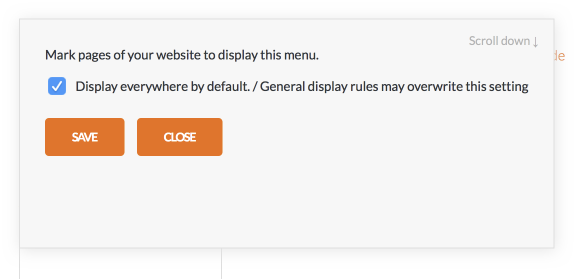
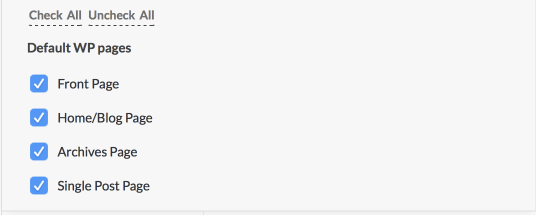
Its’ currently assigned for index pages instead to all pages. I went ahead and changed it.
Cheers!
-
AuthorPosts
- <script> jQuery(function($){ $("#no-reply-1170453 .bbp-template-notice, .bbp-no-topic .bbp-template-notice").removeClass('bbp-template-notice'); }); </script>
