Tagged: x
-
AuthorPosts
-
September 25, 2016 at 8:49 pm #1190223
 Dorothy VParticipant
Hello, hello.
My client has a third party custom Java script that was such a pain to get to even load (I know NOTHING about Java). I got SOME feedback from the developer and tried it using the Raw Code in Cornerstone (issues) and 3 different ways in the Customizer, finally getting it to work … but now it shows up on every single page! Help!!
Also, since installing it I’m getting all kinds of error on my dashboard. 🙁 She’s adamant that this stay part of the site and I’m worried it’s going to mess up all of my work.
September 25, 2016 at 9:00 pm #1190227 Rue NelModerator
Hi There,
Thanks for writing in! Please edit your page using Cornerstone, go to the settings tab, Settings > Custom JS and insert the following custom js code instead:
var url='http://motiliti.net/LiveOnPageClient.ashx?ci=8384&pi=carrie_elk_home';var tt=new Date().getTime();document.write('<script type="text/javascript" ');document.write('src="'+url+'&t'+tt+'='+tt+'">');document.write('</script>');Please let us know if this works out for you.
September 25, 2016 at 9:00 pm #1190228Dorothy VParticipantUpdate, figured out the error messages were coming from a plugin, so no worries on that part.
Still need assistance on making java front page only if at all possible. Thank you!
September 25, 2016 at 9:08 pm #1190235Dorothy VParticipantThanks for responding so quickly. Unfortunately this did not work – if you check the site now after I made the suggested changes, the video still pops up on the Testimonials page for example.
September 25, 2016 at 9:17 pm #1190237RadModeratorHi there,
The javascript is added in Customizer’s custom javascript. As suggested, please add it or move it in Cornerstone’s custom javascript. They are different 🙂
Cornerstone’s custom javascript is only applicable when editing your page content (eg. home page) in the cornerstone.
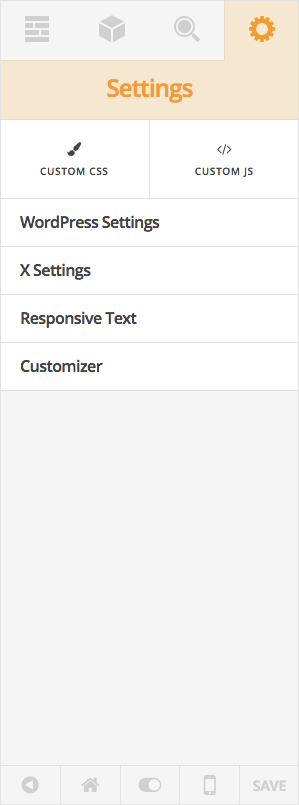
Any code added to Cornerstone’s custom javascript is only available on that page.
Thanks!
September 25, 2016 at 9:20 pm #1190240Dorothy VParticipantWeird! I did that! I will try deleting from Customizer, that’s probably the problem! Sigh.
September 25, 2016 at 9:24 pm #1190246LelyModeratorDo let us know how this goes then Dorothy.
Cheers!
September 25, 2016 at 9:27 pm #1190247Dorothy VParticipantNope, now nothing is showing up at all 🙁
September 25, 2016 at 9:30 pm #1190254Rue NelModeratorHello There,
To assist you better with this issue, would you mind providing us the url of your site with login credentials so we can take a closer look? This is to ensure that we can provide you with a tailored answer to your situation. Once you have provided us with your URL, we will be happy to assist you with everything.
To do this, you can make a post with the following info:
– Link to your site
– WordPress Admin username / passwordDon’t forget to select Set as private reply. This ensures your information is only visible to our staff.
Thank you.
September 25, 2016 at 9:37 pm #1190255Dorothy VParticipantThis reply has been marked as private.September 25, 2016 at 9:50 pm #1190273Rue NelModeratorHello There,
Could please confirm that this is the correct JS code?
var url='http://motiliti.net/LiveOnPageClient.ashx?ci=8384&pi=carrie_elk_home';var tt=new Date().getTime();document.write('<script type="text/javascript" ');document.write('src="'+url+'&t'+tt+'='+tt+'">');document.write('</script>');I have tested it and even on my local testing server, it throws in a JS error. I am guessing that there is something wrong in the code that makes it invalid.
Please let us know how it goes.
September 25, 2016 at 10:08 pm #1190287Dorothy VParticipantthese were the 2 options i was given by the developer:
<script type=”text/javascript”>
var url = ‘http://motiliti.net/LiveOnPageClient.ashx?ci=8384&pi=carrie_elk_home’;var tt= new Date().getTime();document.write(‘<sc’+’ript type=”text/javascript” ‘);document.write(‘src=”‘+url+’&t’+tt+’=’+tt+'”>’);document.write(‘</sc’+’ript>’);
< /script>< script type=”text/javascript” src=”http://motiliti.net/LiveOnPageClient.ashx?ci=8384&pi=carrie_elk_home” language=”javascript”>
//<![CDATA[//]]>
< /script>September 25, 2016 at 10:23 pm #1190299Rue NelModeratorHello There,
Because what you are trying to accomplish requires a template customization, we would like to suggest that you use a child theme. This allows you to make code changes that won’t be overwritten when an X update is released. After your child theme is setup, please review how we recommend making template changes in Customization Best Practices.
After the child theme is set up, please add the following code in your child theme’s functions.php file
function add_javascript(){ ?>
  <?php if ( is_home() || is_front_page() ) : ?>
    <script type="text/javascript">
    var url = 'http://motiliti.net/LiveOnPageClient.ashx?ci=8384&pi=carrie_elk_home';var tt= new Date().getTime();document.write('<sc'+'ript type="text/javascript" ');document.write('src="'+url+'&t'+tt+'='+tt+'">');document.write('</sc'+'ript>');
    </script>
  <?php endif; ?>
<?php }
add_action('wp_footer', 'add_javascript');
The code will ensure that it will only be loaded in the homepage.
Hope this helps. Kindly let us know.
September 28, 2016 at 6:48 pm #1194800Dorothy VParticipantOK! Now we are getting somewhere – the only problem left is that it still shows up on the BLOG (“News”) page under the media parent. But it does seem to be working on everything else!! Any ideas on removing from the blog page?
September 28, 2016 at 7:23 pm #1194835Dorothy VParticipantI GOT IT!!!! For anyone else having this problem here is my code (you’ll have to edit your own links obviously)
function add_javascript(){ ?>
  <?php if ( is_front_page() ) : ?>
    <script type="text/javascript">
    var url = 'http://motiliti.net/LiveOnPageClient.ashx?ci=8384&pi=carrie_elk_home';var tt= new Date().getTime();document.write('<sc'+'ript type="text/javascript" ');document.write('src="'+url+'&t'+tt+'='+tt+'">');document.write('</sc'+'ript>');
    </script>
  <?php endif; ?>
<?php }
add_action('wp_footer', 'add_javascript');
I used what ThemeCo peeps provided, but I think the reason it was showing up on Frontpage and Blog page was the original php provided in line 2 ….
<?php if ( is_home() || is_front_page() ) : ?>By designating to both the HOME as well as FRONT PAGE, I think it directs to both rather than an “either or” because in WP we have the option to set our home page as either static or recent posts. Mine is static. But if WP pulls the same code for both types of pages, it makes sense that the script would run on both. By removing the text “is_home() ||” I was able to have the video script run on the FRONT PAGE ONLY!!
woohoooooooooo!
I still say this theme has the best support ever. Thank you all for your assistance, I just had to study what was provided and talk out my thoughts with a friend.
-
AuthorPosts
- <script> jQuery(function($){ $("#no-reply-1190223 .bbp-template-notice, .bbp-no-topic .bbp-template-notice").removeClass('bbp-template-notice'); }); </script>
