-
AuthorPosts
-
July 30, 2014 at 10:00 am #75405
 Marc NParticipant
Hi there,
I have now installed and set up a WooCommerce shop. Now I have a few problems.
The shop is only partially in the desired language (German). The cart, the checkout page and the page after the purchase are still in English. How is it possible this switch to German?
At the bottom of the check-out page (http://54188319.swh.strato-hosting.eu/shop/checkout/) there is a problem with the button. Is there the possibility the next button to put under it?
And the last point: How can I change the link on the empty shopping cart page.
July 31, 2014 at 7:23 am #75953 MrinalMember
Hi Marc,
Thanks for writing in!
1) You need to translate your whole theme text variables, check this KB: http://theme.co/x/member/kb/translation/ on how to translate.
2) You need to update your theme to latest version, currently you’re using version 2.0.1 which is pretty old. So you need update it to version 2.2.0. Check the button shows fine in our demo: https://theme.co/x/demo/shop/integrity/checkout/
3) The link on empty shopping cart page is linked to original shop page, I want to know isn’t fair for you? Where you want you to redirect it?
Have a nice day, Cheers!
August 1, 2014 at 4:03 am #76387Marc NParticipant1) Oh damn, that´s hard. Look what I’ve tried. But the plugins were not found. Can you help me with my particular problem type?
2) In my admin section nothing is angzeigt it. How can I start a manual update?
3) I have created a custom store page and would like to use only these.
August 2, 2014 at 4:23 pm #76852RadModeratorHi Marc,
1. What plugins are your referring? Some are premium which might need to purchase. But I guess you will need some developer assistance if you’re not familiar with these translator. There many plugins available, premium and free but we can’t cover every documentation they have as we don’t support it. We can only offer the references .
2. Check this http://theme.co/x/member/forums/topic/visual-composer-wont-work-after-update/#post-73671 for more details.
3. You should have store settings at Admin > Woocommerce > Settings > Products and choose the pages your woocommerce should use. If you just wan’t to change the slug, then you may edit those pages and change its Parent Page and SLUG.
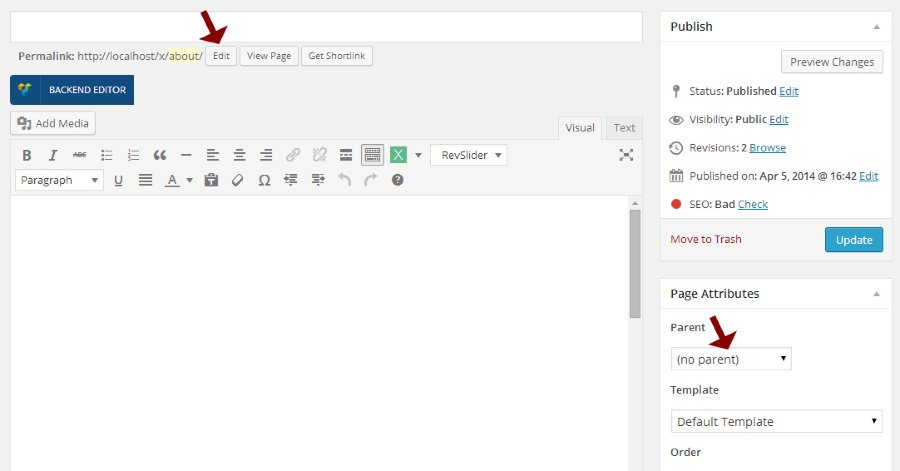
Thanks.
August 5, 2014 at 4:22 am #78014Marc NParticipantHi,
1) But i use the recommended plugin: WPML
2) Oh, what´s going on? A Update is so costly. From other Themes I know updates direct from WordPress?
3) I think we’re talking past each other. Please look at this URL http://54188319.swh.strato-hosting.eu/shop/ i create an own Shop Layout. But when i come to the empty cart http://54188319.swh.strato-hosting.eu/shop/warenkorb/ an puch the button to go back to the shop. It goes to the “other” shop. I need a possibility to replace the “original” shop with my shop.
August 5, 2014 at 8:06 am #78103Marc NParticipant1) And with every other theme works the translation without problems.
August 5, 2014 at 1:07 pm #78316MrinalMemberHi Marc,
1) Every string of theme is translatable via WPML > String Translation please check the option in plugin settings of WPML.
2) Free Themes are hosted in WordPress.org so they’re easy to update, premium themes are managed by their author so different author follows different methods. At present we don’t have any automatic update process but we’re working behind to make this happen. For now please pardon us & update your theme manually.
3) Please share your login info, by default your empty cart button should have original page link on the Return button. Let me check it first to confirm what is wrong in your site via backend.
Have a nice day, Cheers!
August 6, 2014 at 9:02 am #78821Marc NParticipant1) ok, i got it. Thx!
2) Is it possible to get the button via custom css in the right position?
3) Next message
August 6, 2014 at 9:04 am #78823Marc NParticipantThis reply has been marked as private.August 6, 2014 at 9:43 am #78850CousettMemberHi Marc,
To move the button on the checkout page over to the left more use margin-left with some custom CSS.
body.page-id-9 .x-btn, .button, [type="submit"] {
margin-left: 20px;
}
I hope this helps.
August 7, 2014 at 9:30 am #79761Marc NParticipantHi,
thx for your answer.
Unfortunately solves the not my problem. Now the buttons are moved to the previous pages. Is it also possible to set the checkbox in front of the text and the button underneath?
August 7, 2014 at 9:33 am #79764Marc NParticipantPoint 3? The link…
August 7, 2014 at 9:35 am #79765CousettMemberI would suggest possibly looking into the z-index css properties – The z-index property specifies the stack order of an element. An element with greater stack order is always in front of an element with a lower stack order. There is more information on the W3Schools page – http://www.w3schools.com/cssref/pr_pos_z-index.asp
I hope this helps.
August 8, 2014 at 3:03 am #80392Marc NParticipantHi i know the z-index.
But how could that help me with my problem?
2) Put the button in the right positon without moving other buttons
3) Custom the Link with my URL in the empty cart
August 8, 2014 at 5:36 am #80451MrinalMemberHi Marc,
1) You can’t edit any button or place a new element in WooCommerce generated pages. It requires huge customization which is out of our support scope & policy. You may wish to consult a developer to tweak the things for you.
2) The Empty cart or Return to shop button is now linking to original shop page, previously you selected Dummy Page as your shop page. I just changed it form WooCommerce > Settings > Produkt-Archiv / Shop-Seite

-
AuthorPosts
- <script> jQuery(function($){ $("#no-reply-75405 .bbp-template-notice, .bbp-no-topic .bbp-template-notice").removeClass('bbp-template-notice'); }); </script>
