-
AuthorPosts
-
June 2, 2015 at 1:29 pm #290079
 tincansParticipant
Hi,
I was having the same issue, but though following this thread I was able to get it working.
However, my problem now is that menu links pointing to specific tabs do not work while you are still on the same page.
For example, once I follow the menu link to #tab-2, and then click a link in the menu that is directed to #tab-3 on the same page, nothing happens. (It does update the path in the browser window though.)
Is there a way to force the page to refresh when you click on one of the tab links?
Thanks
June 3, 2015 at 3:56 am #290720 Paul RModerator
Hi,
Thanks for writing in! To assist you with this issue, we’ll first need you to provide us with your URL. This is to ensure that we can provide you with a tailored answer to your situation. Once you have provided us with your URL, we will be happy to assist you with everything.
June 3, 2015 at 7:40 am #290903tincansParticipantThis reply has been marked as private.June 3, 2015 at 3:11 pm #291530RadModeratorHi there,
The implementation will be different since you added it as menu item. Pleas try this one,
jQuery( function($){
$( document ).ready( function(){
scroll_to_tab ( location.href.split("#").slice(-1)[0] );
});

$('.current_page_item.link_to_tab a').on( 'click', function( e ){
var window_base = location.href.split("#").slice(0)[0];
var url_base = $( this ).attr('href').split("#").slice(0)[0];
if ( window_base == url_base ) {
scroll_to_tab ( $( this ).attr('href').split("#").slice(-1)[0] );
e.preventDefault();
}

});

function scroll_to_tab ( tab_id ) {
var tab_nav = $('.x-nav-tabs .x-nav-tabs-item a[href="#' + tab_id + '"]');
if(tab_nav.length >=1) {
$( tab_nav ).trigger('click');
$('html,body').stop().animate({scrollTop: $(tab_nav).offset().top - ( $('.x-navbar').height() + 50 ) },700 ,'swing');}
}
});
Then edit your selected menu items (about us where linked to tab), then add link_to_tab on its class attribute.
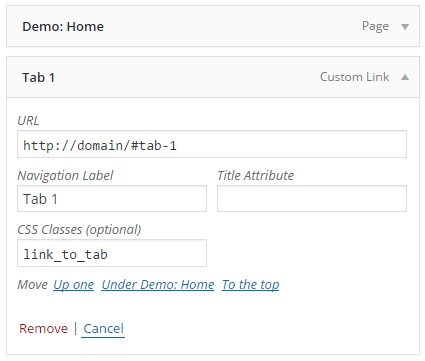
If you can’t find the class option, then please enable it at Screen Options on top of your page.
Hope this helps.
June 4, 2015 at 10:54 am #292596tincansParticipantThis reply has been marked as private.June 4, 2015 at 10:48 pm #293164RadModeratorHi there,
Yes, and the suggested fix should do it.
http://tcubeta06.info/about-us/#tab-1 this is not linking to tab since you’re already on that page. And in order to perform tab switching, it needs to perform click event.
The problem is your menu item isn’t attached to that click event.
This code attaches the click event to the button that has link_to_tab class,
$('a.link_to_tab, .link_to_tab a').on( 'click', function( e ){The problem is that your menu item no link_to_tab class. Which is why clicking it will not open you target tab.
The requirement of that code is simply adding link_to_tab to the button. And since your menu item is not a button. Then I change it to this,
$('.current_page_item.link_to_tab a').on( 'click', function( e ){Where it select the current page menu item has link to tab and attach the click event.
Please ensure that you don’t have any caches before testing. I tested it directly at your site and it works. Or please provide a login credentials so we could check is there is any other script that causes the conflict.
Thanks!
January 27, 2016 at 3:13 pm #767560 Samer KParticipantThis reply has been marked as private.January 27, 2016 at 10:08 pm #768104Rue NelModerator
Hello There,
Thanks for writing in! Yes it would work though the JS code would need some tweaking because it will not apply to your setup. For the meantime, please check out these topics:
https://community.theme.co/forums/topic/open-accordion-from-link/
https://community.theme.co/forums/topic/anchor-links-in-accordions/page/5/#post-85609Hope this may help.
April 4, 2016 at 2:58 pm #866483 brieucadamParticipant
Hi there,
I am trying to do the same thing. This is my website : new.zennit.be. I want the links in the first section to each link to a tab in the second section.
I added the code to JS Editor in Appearance > Customizer and try to add #tab-2 to my url but it does not work.
Could you be so kind to have a look?
Thanks,
Brieuc
April 5, 2016 at 4:26 am #867363Paul RModeratorHi Brieuc,
In your case, please change the js code to this.
jQuery( function($){
$( document ).ready( function(){
scroll_to_tab ( location.href.split("#tab-").slice(-1)[0] );
});

$('.link_to_tab a').on( 'click', function( e ){
var window_base = location.href.split("#").slice(0)[0];
var url_base = $( this ).attr('href').split("#").slice(0)[0];
if ( window_base == url_base ) {
scroll_to_tab ( $( this ).attr('href').split("#").slice(-1)[0] );
e.preventDefault();
}

});

function scroll_to_tab ( tab_id ) {
    console.log(tab_id);
var tab_nav = $('.x-nav-tabs .x-nav-tabs-item a[data-cs-tab-toggle="' + tab_id + '"]');
if(tab_nav.length >=1) {
$( tab_nav ).trigger('click');
$('html,body').stop().animate({scrollTop: $(tab_nav).offset().top - ( $('.x-navbar').height() + 50 ) },700 ,'swing');}
}
});
Then add link_to_tab class to your feature box elements.
http://screencast.com/t/cZWeebZu1Q
Hope that helps.
July 29, 2016 at 10:52 am #1108965 PaddyThorneParticipant
Hi there,
I have created a new website using Theme X and would like to link from some icons/buttons on the home page to a separate page. On the separate page I would like to stay at the top of the page (not scroll down), but open specific tabs on the page.I have read all the way through this thread and several other threads, including this one: https://theme.co/x/member/forums/topic/open-accordion-from-link/#post-65132 and have tried many of the solutions provided, but none of them seem to work exactly as I would have hoped.
The site is here: http://muscliff.poonja.co.uk
And I am linking to tabs on the Facilities page here: http://muscliff.poonja.co.uk/about-us/facilities
If you could offer me some help getting this working I would really appreciate it.
Best,
PaddyJuly 29, 2016 at 4:39 pm #1109422NicoModeratorHi There,
Thanks for writing in.
Would you mind sharing us your admin credentials in a new thread so we could check your setup closer and the things you did.
Don’t forget to set it as private reply.
Thanks.
-
AuthorPosts
- <script> jQuery(function($){ $("#no-reply-193142 .bbp-template-notice, .bbp-no-topic .bbp-template-notice").removeClass('bbp-template-notice'); }); </script>
